Articles on: Agreements & Signatures

Creating and managing agreement templates

Creating and managing agreement templates


A template is the document you write once and reuse for every counterparty. You build it in the standard dashboard form (the same .f fields and shell you use for listings and boarding), and Creatures fills in the names, animal, and date for you each time you send it. As the editor itself says: you author and own the text; Creatures records the signatures. Creatures supplies no legal language, does not review what you write, and none of this is legal advice. Have your own attorney review whatever you use.


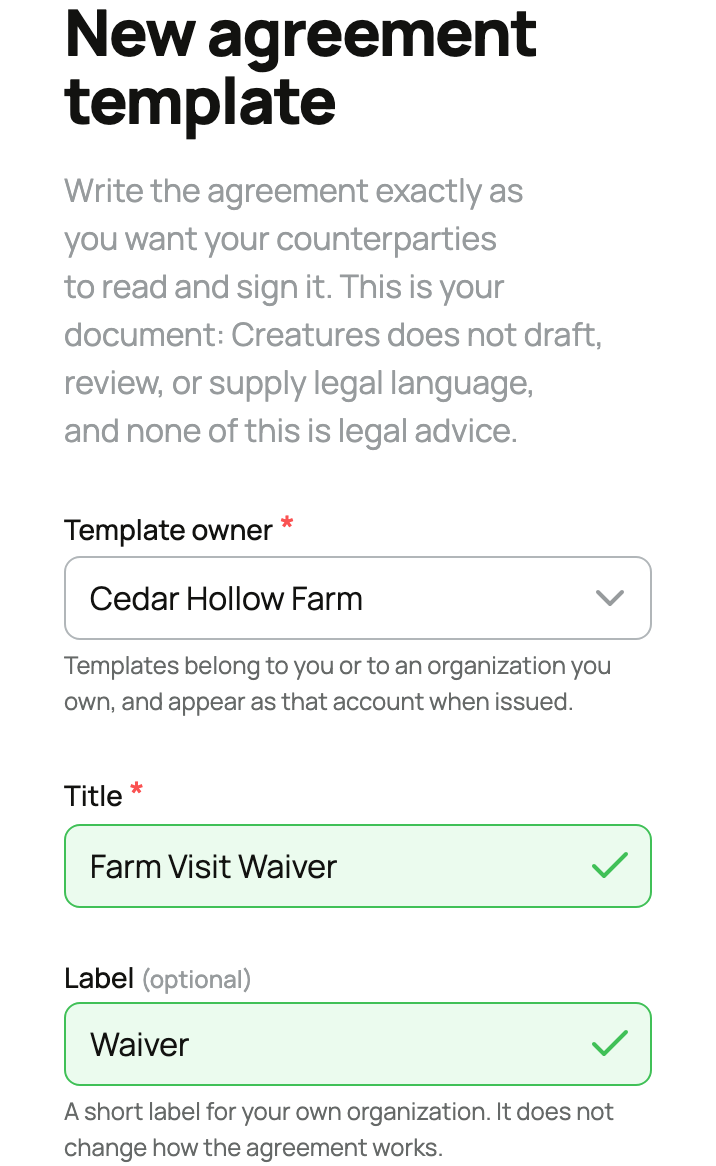
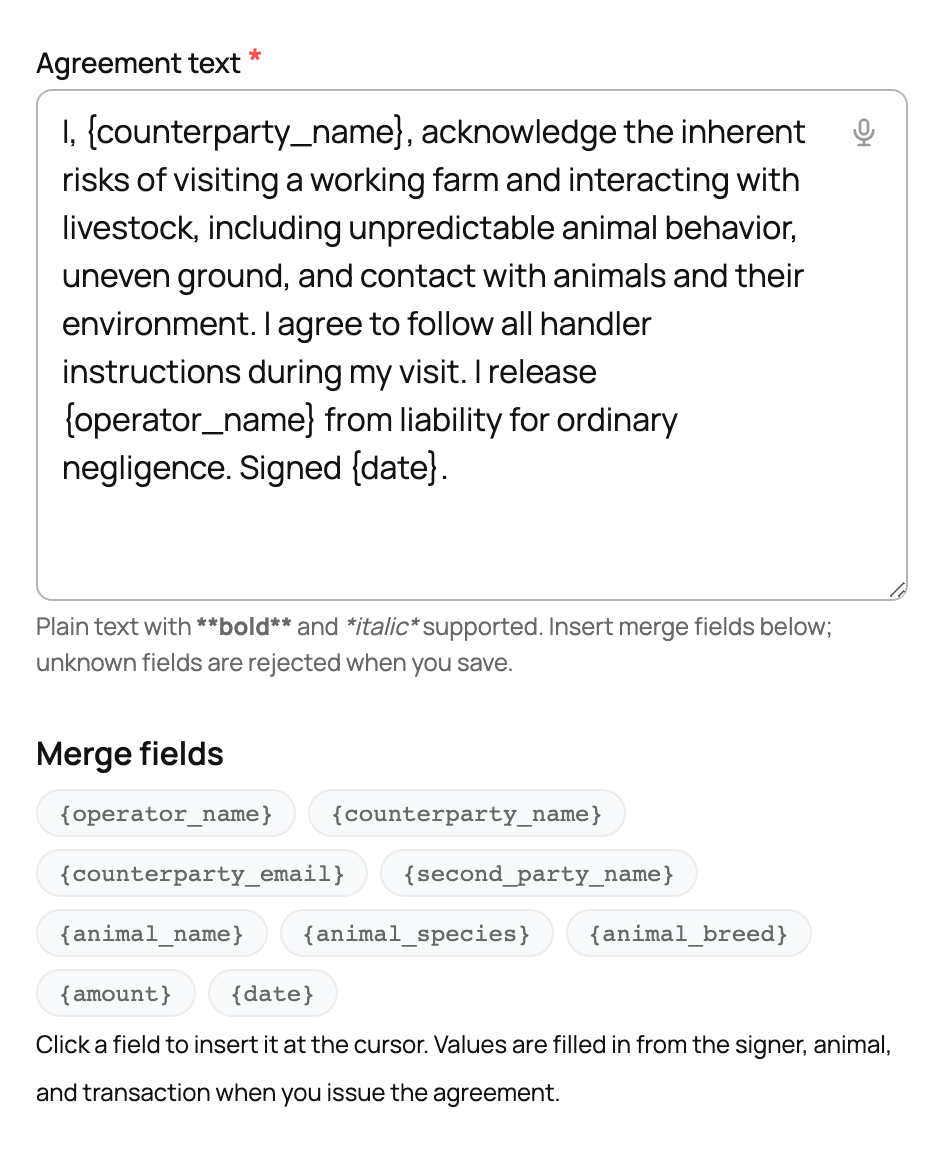
The template editor: title, label, agreement text, and the merge-field helper


The fields, one by one


Template owner (only shown if you manage more than one account)


  • What it is: who the template, and any agreement issued from it, belongs to: yourself, or an organization you own or co-own.
  • The values: your own account, plus each organization where you are an owner or co-owner.
  • What choosing it means: the agreement is issued as that account, so the owner you pick is the party who appears as the issuer to the signer.
  • The implication: pick the legal entity that should appear on the document. If you only manage your own account, this field does not appear and the owner is simply you.


Title (required, up to 120 characters)


  • What it is: the document's name, for example "Farm Visit Liability Waiver" or "Health Guarantee".
  • The values: any text up to 120 characters.
  • What choosing it means: the title is shown to signers and labels the agreement in your lists.
  • The implication: name it for what it is, because both you and the signer read it.


Label (optional, up to 60 characters)


  • What it is: a private organizing tag for your own dashboard, with a suggestions list to pick from (Waiver, Sale contract, Health guarantee, Deposit agreement, Stud contract, Co-ownership agreement, Boarding agreement) or type your own.
  • The values: any text up to 60 characters, or nothing at all.
  • What choosing it means: it groups and filters templates in your view only. It does not change how the agreement works and the signer never sees it.
  • The implication: use it purely for your own filing. Leaving it blank changes nothing about the document.


Agreement text (required, up to 50,000 characters)


  • What it is: the full body of the document.
  • The values: plain text up to 50,000 characters. **bold** and *italic* are supported. Any HTML you paste is shown as literal text, never interpreted, so it is safe but unstyled.
  • What choosing it means: this is the contract the signer reads and signs, exactly as you wrote it.
  • The implication: write the contract once and reuse it for everyone; the variable parts fill themselves in through merge fields, covered next.


Merge fields: write it once, fill it in at send time


Merge fields are {token} placeholders the system replaces with real values when you issue the agreement. The set is an allowlist, and it is case-sensitive: a token that is not on the list, or is mis-cased like {Counterparty_Name}, is rejected when you save, with a message that lists the unknown tokens and the full set of allowed ones. You cannot invent your own merge fields.


The allowed fields, what each fills from, and whether it is automatic:


  • {operator_name}: your name, or the issuing organization. Fills automatically from the owner account.
  • {counterparty_name}: the first signer's name. Fills automatically from signer slot 1.
  • {counterparty_email}: the first signer's email. Fills automatically from signer slot 1.
  • {second_party_name}: the second signer's name, for two-party agreements. Fills automatically from signer slot 2.
  • {animal_name}, {animal_species}, {animal_breed}: fill automatically from the animal you link at send time.
  • {date}: the issue date. Fills automatically.
  • {amount}: a transaction amount, when one is relevant. This is the only field you type by hand at send time, up to 300 characters. It is plain text printed in the document, not a charge. Issuing or signing the agreement collects no money; the amount is descriptive wording only.


The implication of the allowlist: the names, animal details, and date take care of themselves when you send, and you cannot accidentally ship a broken placeholder, because an unknown token is caught at save. There is also a send-time check, covered in the sending article: every token your body uses must resolve to a real value before the agreement can go out.


Versioning: your edits never change documents people already signed


Templates are immutable by version. A template family keeps its history:


  • Editing a published template creates a new version (N+1). The previous versions are never altered.
  • Agreements already issued keep their pinned version. A document someone signed keeps rendering the exact text they saw, forever.
  • A no-op edit does not burn a version. Saving with an identical title, label, and body changes nothing.
  • Issuing always uses the latest active version at the moment you send.


The implication: you can keep improving your template without ever changing a document that has already been signed. People who signed version 1 keep version 1; new sends use the newest text.


Archiving and restoring


Your templates and the agreements you have issued from them both live under the Agreements tab, so the same place you build a template is where you tidy up the ones you are done with.


Your agreements dashboard: template cards and the issued list


  • Archive: hides the template family from the pickers you see when issuing or editing, so it is out of the way. Every agreement already issued from it stays fully intact and viewable, and the stored text stays immutable.
  • Restore: brings an archived family back into the pickers.


The implication: archiving is housekeeping, not deletion. Nothing that was signed is affected, and you can restore a family whenever you want to use it again.


Both the template list and the editor repeat the same line, and it is worth taking seriously: you author and own the text; Creatures records the signatures. Creatures does not supply, draft, or review legal language, and using the feature is not legal advice. For anything with legal weight, have your own attorney review what you use.


Once your template is ready, the next step is sending it. See Sending an agreement for signature. A template can also be attached to a bookable offering as a waiver that a customer must sign before they can pay.


Updated on: 23/06/2026

Was this article helpful?

Share your feedback

Cancel

Thank you!