Articles on: Agreements & Signatures

Signing an agreement, and requiring one before a booking

Signing an agreement, and requiring one before a booking


This article has two audiences: the person who received an agreement and needs to sign it, and the operator who wants to require a signed agreement before someone books a session. As with every agreement on Creatures, the sender authored and owns the text; Creatures only records the signatures. None of this is legal advice, and Creatures supplies no legal language.


Part 1: Signing an agreement you received


You do not need a Creatures account to sign. You received an email with a personal signing link that is yours alone, single-use for the act of signing, and good for 30 days.


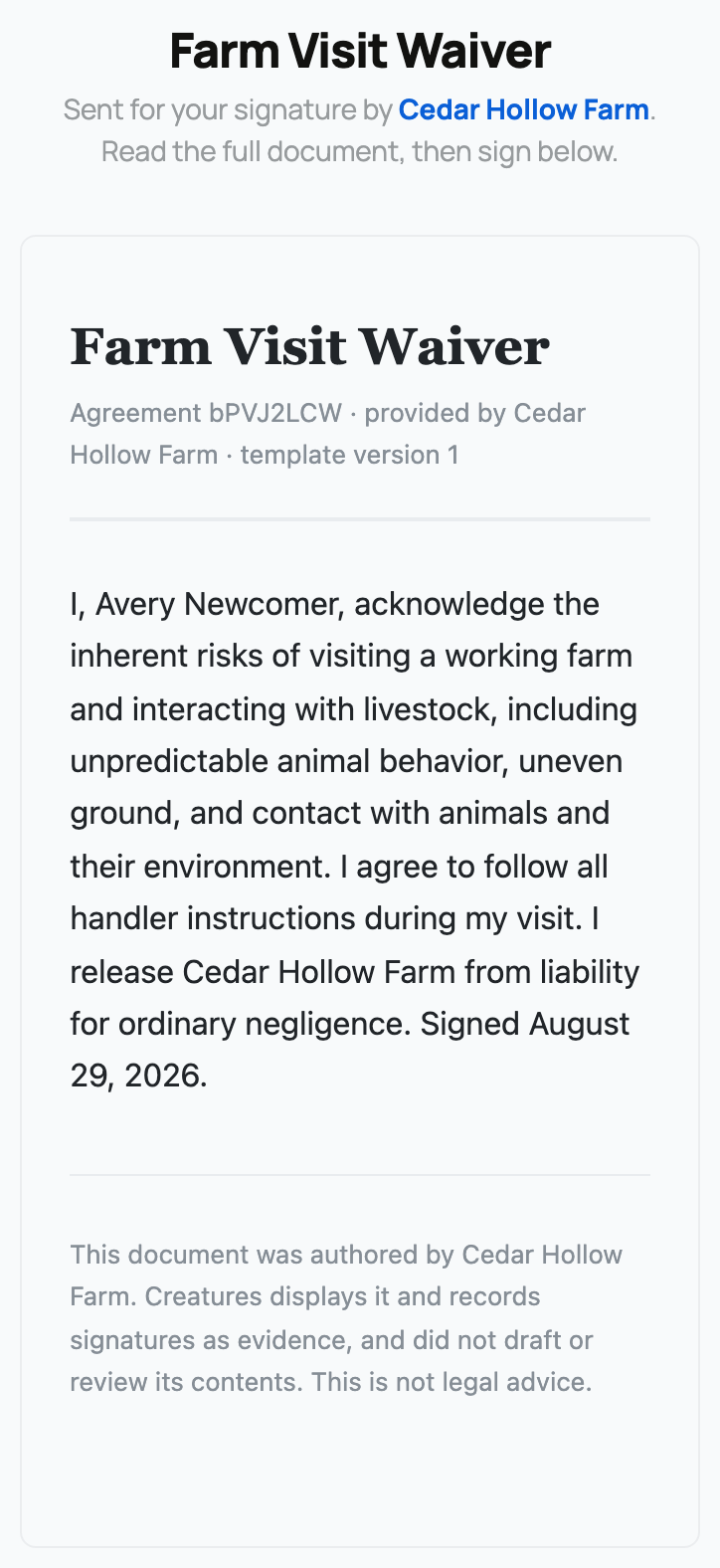
The signing portal: document viewer, name, email, and the consent box


What the signing portal shows


When you open your link, the portal shows:


  • Who sent it: the operator's name, so you know who you are dealing with.
  • The full document: the exact text to sign, shown in a viewer you can read top to bottom before you do anything.
  • A name field: pre-filled with the name the sender expected, which you can correct to your full legal name.
  • An email field: to confirm your email.
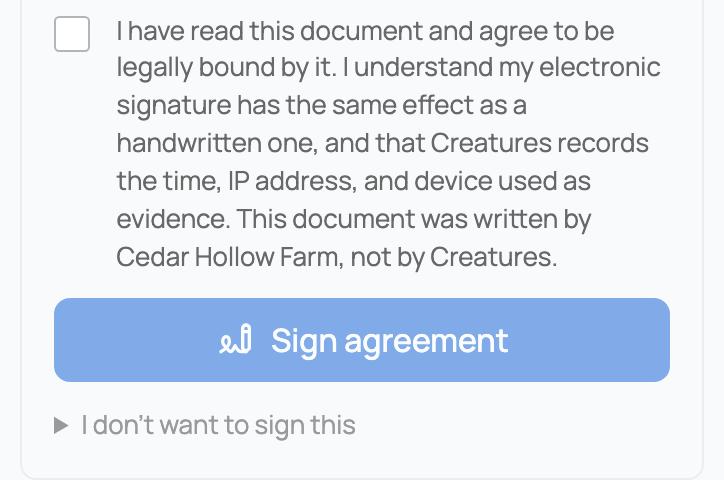
  • A required consent checkbox: the Sign button stays off until you tick it.


How to sign


Signing is typing your full legal name, ticking the consent box, and pressing Sign. That typed name is a legal e-signature, with the same effect as signing by hand. The moment you sign, Creatures records the time, your IP address, and your device, along with the consent sentence and a fingerprint of the document, as evidence of exactly what you agreed to. You are free to read the whole document before signing; nothing is submitted until you press Sign. Your name field accepts up to 120 characters. If the name or email you submit differs from what the sender expected, your signature still counts; the difference is simply noted for the sender.


Declining instead


If you do not want to sign, there is an "I do not want to sign this" option with an optional reason that is shared with the sender. Declining ends the agreement for everyone: it voids the whole document and revokes every signing link on it, including other signers' links. Use it when you genuinely will not sign, because it cannot be undone.


After you sign


  • If others still need to sign, you see "your signature is recorded, waiting on the others."
  • Once everyone has signed, you see "Agreement completed," and you can view or download the final signed copy. Its appendix shows every signer's evidence.
  • If you have a Creatures account, you can also reach the agreement from your in-app notifications, without needing the email link.


What the error pages mean


  • A link is needed: you opened the agreement's address without your personal link. The bare address reveals nothing.
  • The link expired: more than 30 days have passed. Ask the sender to resend a fresh link.
  • No longer active: the sender voided or replaced the agreement, so it can no longer be signed.


Your privacy


The plain agreement address shows nothing on its own. Only your valid personal link, or your signed-in account if you are a listed signer, opens the document. Links are stored in a hashed form, are bound to your one signer slot, and rotate when resent, so an old or leaked link reveals nothing.


Part 2: Requiring a signed agreement before a booking


If you run bookable offerings (tours, classes, lessons, appointments), you can require one of your own agreement templates as a waiver that must be signed before a customer can pay. If you have not set up an offering yet, see Creating a bookable offering: tours, classes, and appointments.


A completed agreement with its Signature record appendix


How the booking waiver works


  • Attach it on the offering. On a bookable offering you can set a required agreement, chosen from your own active templates (Creatures validates that the template is one of yours).
  • It is issued automatically at booking. When a customer books that offering, Creatures issues the agreement to them as part of checkout, without you sending anything by hand.
  • Payment is blocked until it is signed. The customer cannot pay until the agreement is signed and completed. This is enforced on Creatures' side, not just hidden in the page.
  • The implication: use this for any booking with a liability or safety aspect, such as a farm visit, a riding lesson, or a hands-on class. The signed waiver is attached to the booking afterward. For the rest of running bookings (your schedule, check-in, and the calendar feed), see Taking bookings: schedule, check-in, promos, and the calendar feed.


This is the one place an agreement sits in front of a payment, and even here the agreement itself is free. It gates the booking payment, but signing it is not a charge; the payment is the separate booking checkout.


The other two ways an agreement gets sent today


Three issue paths actually ship a way to send an agreement right now:


  • Manually, the main path, where you fill out the issue form and send to anyone. See Sending an agreement for signature.
  • As a booking waiver, described just above, issued automatically when a customer books.
  • As an invoice waiver, where an invoice you create can require a signed agreement before it can be paid. On the new-invoice form there is a "Require a signed agreement before payment" option with a template picker; choosing one issues your agreement to the customer and holds the invoice's payment until that agreement is completed.


What is not yet available


The agreement engine also recognizes some other transaction types internally (an animal sale, a boarding subscription, a stewardship, a marketplace listing), but none of those have a button to attach an agreement today. So right now you attach an agreement in one of three ways: manually, as a booking waiver, or as an invoice waiver. We are telling you this plainly so you do not go looking for a "require an agreement" control on a sale or a stewardship that does not exist yet.


To understand the whole feature and what a signature records, see What agreements are and how signing works. To send one yourself, see Sending an agreement for signature.


Updated on: 23/06/2026

Was this article helpful?

Share your feedback

Cancel

Thank you!