Articles on: Agreements & Signatures

What agreements are and how signing works

What agreements are and how signing works


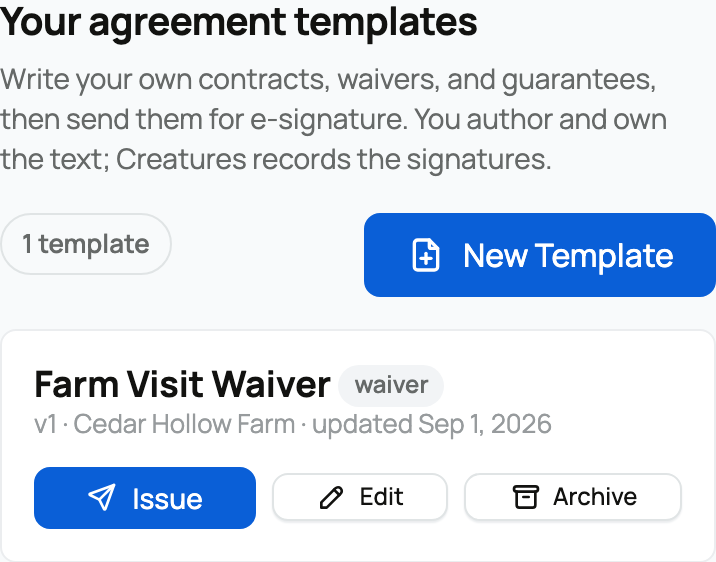
Agreements are how you put a document in front of someone and collect a real, recorded signature on Creatures. You write a contract or waiver in plain text, send it for e-signature, and Creatures records each signature with evidence and keeps an immutable copy of exactly what was signed. You find all of this under the Agreements tab in your dashboard.


Your agreements dashboard: templates and the issued list


What Creatures does, and what it does not


Creatures supplies the signing plumbing only. You author and own the text; Creatures records the signatures. Creatures does not draft, review, or supply any legal language, provides no template text to start from, and none of this is legal advice. Have your own attorney review whatever you use. Nowhere does Creatures vet or guarantee an agreement; it records who signed what, and when.


The two roles


There are exactly two sides to every agreement, and they have very different requirements:


  • The operator (you, the sender). This is the person or organization that writes a document and sends it for signature. To send agreements you must be a payout-ready seller, which means three things are set up on your account: your identity is verified, your phone number is verified to a one-time-code standard, and you have a connected payout account (your own, or one through an organization you own or co-own). The reason is trust: a signer needs to know a real, verified party issued the document. If any of the three is missing, Creatures shows you what to finish before you can send. See Verifying your identity, Verifying your phone number, and Connecting your payout account.
  • The signer (the counterparty). This is whoever you send the document to. A signer needs nothing: no account, no verification. They sign through a secure personal link sent to their email. This keeps signing frictionless for the customer, buyer, or partner on the other side.


The lifecycle, in plain language


A single agreement moves through a clear path from draft to signed copy:


  1. Write a template. You author the document once, with merge fields like {counterparty_name} that fill themselves in later. See Creating and managing agreement templates.
  2. Issue it to one or more signers. You pick the template, add up to five signers (name, email, and a role label), optionally link an animal, and send. See Sending an agreement for signature.
  3. Each signer gets their own secure link. Everyone you listed receives a personal signing link by email. Account holders also get an in-app notification.
  4. They read and sign, in any order. There is no required sequence and no separate countersign step. Each person reads the document and signs when they are ready.
  5. It completes. Once every signer has signed, the agreement is Completed, and both sides keep an immutable signed copy with an evidence appendix.


What each agreement status means


The status tells you exactly where an agreement stands:


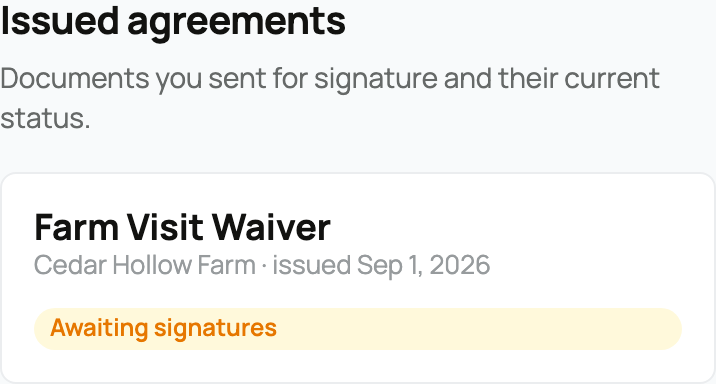
  • Awaiting signatures (pending): set the moment you send it. No one has signed yet, or some signers are still pending and none have signed. The implication: the links are live and you are waiting on people.
  • Partially signed: at least one signer has signed and at least one is still pending. The implication: it is in progress, and you can resend or copy a link for whoever is left.
  • Completed: every signer has signed. This is terminal and triggers the finalized signed document with its evidence appendix. The implication: the agreement is fully executed and cannot change.
  • Voided: you voided it, or a signer declined (a single decline voids the whole agreement for everyone). Terminal. The implication: every outstanding signing link stops working immediately.
  • Replaced: the same as voided, but reached by issuing a replacement. Terminal. The implication: the old document is closed out in favor of the new one, and its links stop working.


A completed agreement cannot be voided. If something needs to change after completion, you issue a replacement instead.


What signing actually is


The signing portal a counterparty sees


Signing on Creatures is typing your full legal name and ticking a consent checkbox. That typed name is the signature, and it has the same effect as a handwritten one. Before the Sign button turns on, the signer reads the document in a viewer, types their full legal name (rejected if it runs over 120 characters), confirms their email, and checks the required consent box.


At the moment they sign, Creatures records the evidence: the submitted name and email, the time, the IP address, the device (browser and system), the exact consent sentence they agreed to, and a SHA-256 fingerprint of the document. If the typed name or email does not match the name you expected for that slot, Creatures records an identity-discrepancy note for you. It does not block the signature; the typed name still binds. Signing is never silently changed or rejected for a small mismatch; it is signed and flagged.


The evidence and the immutable copy


This is why an e-signature on Creatures holds up. Every signed document carries:


  • A SHA-256 fingerprint: a unique code computed from the document's exact contents. If a single character changed, the code would change, so it is tamper-evident proof of precisely what was signed.
  • A "Signature record" appendix: added to the completed document, listing every signer with their submitted name, role, signed-at time (in UTC), email, IP address, device, and the consent sentence.


The point is a clean, durable record of exactly what was agreed, by whom, and from where. Both sides can view and download the finished document. If the agreement was linked to an animal, the completed copy also appears on that animal's record, visible to the parties only.


Each signing link is personal to one signer, single-use for the act of signing, and expires after 30 days. If you, the sender, void the agreement, or any signer declines, every outstanding link is revoked at once. What a signer sees if they open a link that is no longer good:


  • A link is needed: they opened the agreement's address without their personal link. The bare address reveals nothing about the document.
  • The link expired: more than 30 days passed. They ask you for a fresh one.
  • No longer active: you voided or replaced the agreement.


Signing does not pay for anything


An agreement is a document, not a transaction. Issuing or signing one triggers no fee, no charge, and no payment of any kind. Even the {amount} field that can appear in a contract is plain descriptive text, not a charge. The only place an agreement touches money at all is the booking waiver, where a signed agreement can be required before a customer pays for a booking, and even then the agreement itself is free and the payment is the separate booking checkout. See Signing an agreement, and requiring one before a booking. If a document refers to sale money, that money is still held securely by Creatures under the normal marketplace protection; see How buying works: payments, held funds, and protection.


Where to find it


Everything lives under the Agreements tab in your dashboard: your templates, every agreement you have issued, and their current status. The tab shows a count of agreements you have sent that are still awaiting signatures or partially signed, so you can see at a glance what is outstanding.


Updated on: 23/06/2026

Was this article helpful?

Share your feedback

Cancel

Thank you!