Articles on: Your Profile & Organization

Getting listed in the breeder directory

Getting listed in the breeder directory


People sometimes expect that having a Creatures account, or even listing animals for sale, automatically puts them in the breeder directory. It does not, and the reason is worth understanding so you end up listed where you want to be.


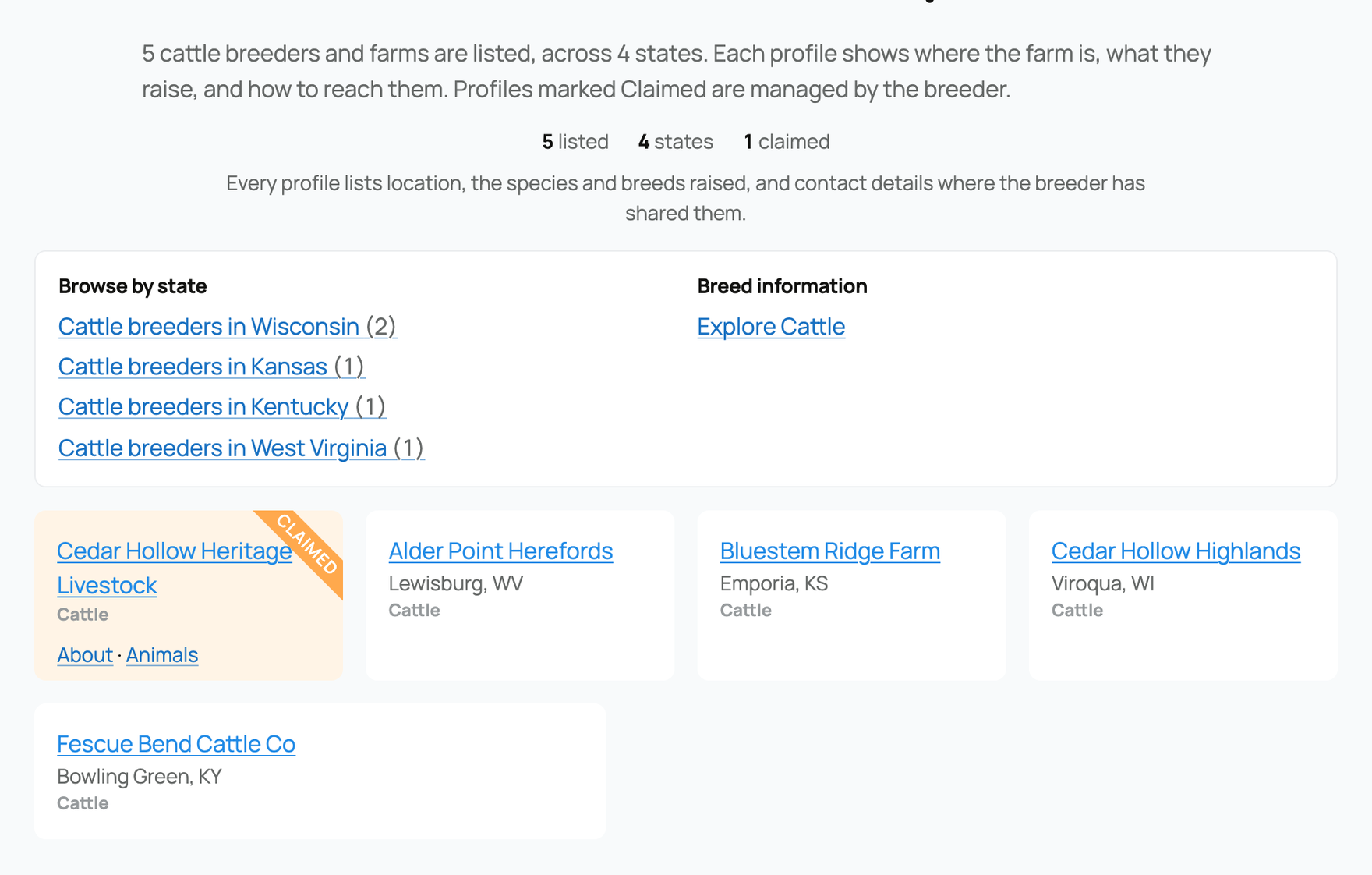
The Creatures breeder directory


Two different things: your profile vs. the directory


  • Your personal profile at creatures.com/u/{username} always exists the moment you have an account. Anyone with the link can visit it, and it shows your animals, listings, and posts.
  • The breeder directory at creatures.com/directory/breeders is a separate, browsable index of breeders that people search by species, breed, state, and name. Being in the directory is what lets someone who has never heard of you discover you there.


A plain user account, even one with animals listed for sale, does not appear in the breeder directory by itself. The directory lists organizations and claimed breeder profiles, not individual accounts. So if you want to be found in it, you take one of the two routes below.


Route 1: Create an organization


The most common way to get listed is to create an organization and give it a breeding type.


  • How it works: create an org (see Creating an organization and adding your team) and set its type to breeder, farm, or ranch. Organizations of those three types are added to the breeder directory automatically.
  • Staying listed (or not): a qualifying org is listed unless it is hidden from the directory. By default it shows; if you ever want it out of the public index, you can hide it. Deleted or banned orgs do not appear.
  • What it changes: your org becomes searchable in the directory by its species, breeds, and state, so buyers browsing for, say, a breed in your state can find you without a direct link.


Route 2: Claim an imported breeder profile


Creatures also carries imported breeder profiles in the directory that were added from public breeder information, before those breeders joined. If one of these is you, you can claim it.


  • How it works: find your imported profile in the directory (at creatures.com/directory/breeders/{slug}) and use Claim. To prove it is yours, Creatures sends a one-time code to a contact already on that profile, by email or phone, and you enter the code to verify. You get a few attempts at the code before you have to request a new one.
  • People may already be waiting for you. An imported profile can show how many people have asked to be notified when you join, for example "3 people are waiting to connect with you." That count is real interest in your program from people browsing the directory. When you claim the profile, everyone who asked is notified that you have joined, so you arrive with an audience already pointed at your new page.
  • What claiming does: verifying the code turns the imported profile into your own organization that you control and can edit, so the directory entry is now yours to keep accurate.
  • What it changes: instead of a static imported listing, you get a real, editable org page, and you take over the directory presence that was already there.


Which route is right for you


  • If there is no existing entry for you, create an organization of type breeder, farm, or ranch, and you are listed automatically.
  • If there is an imported profile that is you, claim it so you control it rather than creating a duplicate.


Either way, the directory lists organizations and claimed profiles, which is why setting up an org (not just a personal profile) is the step that gets you found. For the full walkthrough of building an org, see Creating an organization and adding your team. To polish the personal profile that your org links back to, see Setting up your profile.


The directory is bigger than breeders


The breeder directory is one wing of a larger public directory. Its front door is creatures.com/directory, a hub with a search box that covers the whole directory and three destination cards: Breeders, Animals (individual animal profiles with records and pedigrees), and Registries (registries, studbooks, and associations). Each card shows a live count of what is inside.


The Creatures directory hub


Below the destination cards is a "Find animal service providers" row, because the directory now lists the people who care for, breed, process, and move animals, not only the people who raise them. There are five service-provider categories, each with its own browsable page:


  • Hoof Care at creatures.com/directory/hoof-care: farriers and hoof trimmers, by species, service, and location.
  • Shearers at creatures.com/directory/shearers: sheep, goat, and alpaca shearers by service area.
  • Reproduction Services at creatures.com/directory/reproduction: AI, embryo transfer, ultrasound, collection, and breeding-service providers.
  • Processing at creatures.com/directory/processing: inspected livestock and poultry processors. Processing is browsed in a farm-species context, so you choose a livestock species first and see the processors that fit it.
  • Transporters at creatures.com/directory/transporters: animal transporters, listed with their authority status so you can see how a hauler is registered before you reach out.


Browsing works the same way in every category: search by provider name, jump by first letter, or filter by service, species, and state. Every listing card shows the provider's location, services, and species, and carries a label. Claimed means the business manages its own Creatures profile; Unclaimed means the listing was created from public information and its owner has not taken it over yet.


A service-provider category page, with the Claim listing link on an unclaimed card


If you provide animal services: claim your listing


Provider listings start out the same way imported breeder profiles do: created from public information about real businesses. If one of them is your business, claiming it makes it yours, and it works much like the breeder claim above.


  • Where to claim: every unclaimed listing has a Claim listing link on its directory card and a Claim this listing button on its page. You need to be signed in to a Creatures account; if you are not, the link walks you through signing up first. Until a listing is claimed, its imported contact details are kept private.
  • Proving it is yours: the claim dialog lists the contact methods already associated with the listing, with the details masked. Pick one and Creatures sends a one-time code to that email address or phone number. You get 3 attempts at the code before you have to request a new one.
  • What claiming creates: verifying the code turns the listing into an organization you own, of the matching type. A hoof care listing becomes a farrier organization, a shearing listing a shearer, and likewise for reproduction, processor, and transport. The listing's name, description, services, species, contact details, and location carry over, you become the owner, and you land on your new page ready to edit it. The listing's old directory address forwards to your new page, so existing links keep working.
  • You stay in the directory: claiming does not pull you out of the category where people found you. Your organization keeps that directory presence, now labeled Claimed and pointing at your real profile. To stay listed, keep a description and a United States location on your organization, and leave it visible in the directory.
  • If none of the contacts work: the same dialog lets you request a manual review instead. If you already manage an organization on Creatures, you can ask to attach the listing to it; otherwise Creatures can create your organization once ownership is verified, and may ask for business documents or a matching website or contact. While that is reviewed, the listing shows your claim as pending.
  • What it changes: an unclaimed listing is a static page of imported information. Claimed, it is a real Creatures organization: you can add photos and services, publish the contact details you want public, and run it like any other organization page. And if you would rather not be listed at all, claiming is also how you request removal.


A registry, association, or club runs a different kind of member directory of its own, for its verified members rather than the public breeders here. See The Association Hub: member directory and badges.


A directory listing is one way to be found, but it is not the same as your own website. Creatures also lets you build a standalone public site with your own pages and web address, separate from your directory presence. See Your Creatures website: what it is and how to open the builder.


Updated on: 22/07/2026

Was this article helpful?

Share your feedback

Cancel

Thank you!