
Your privacy choices: sharing for advertising
Open Your Privacy Choices and turn on Opt out of sharing my information for advertising. That stops Creatures from sharing your activity with advertising partners like Meta, and you can change it back at any time.
Open Your Privacy Choices
You'll find Your Privacy Choices in the links at the bottom of most pages. On a phone, it's also in the menu: tap the three lines at the top right. On a computer, Home shows it with the small links in the right-hand column. You don't need to be signed in.
Turn off sharing for advertising
- In the Sharing for advertising box, turn on Opt out of sharing my information for advertising.
- The status changes from Sharing is on to Opted out, and a note confirms it.
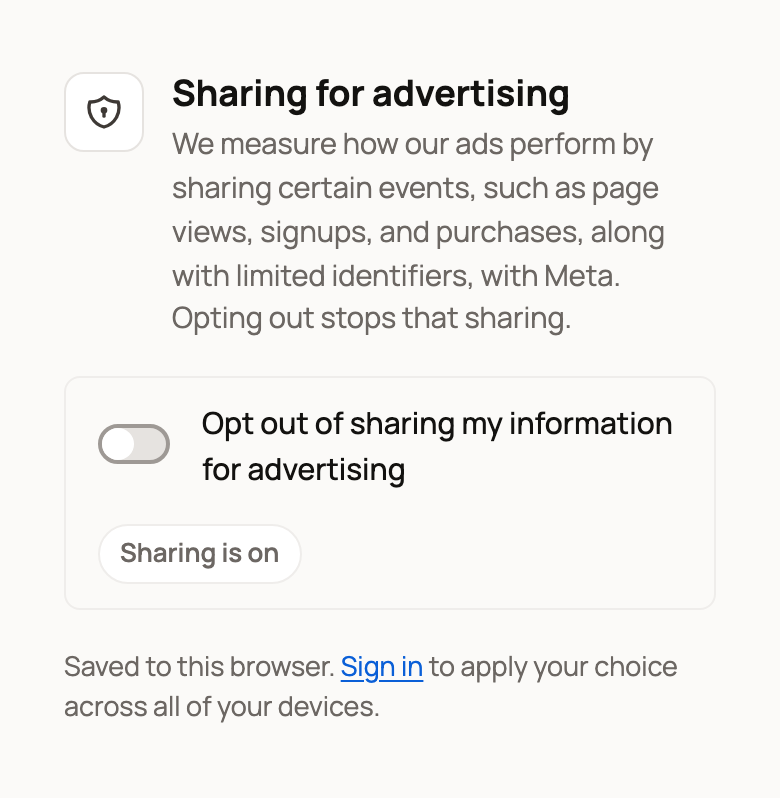
To start sharing again, turn the switch back off.
Signed in? Your choice is saved to your account. It applies on every device where you're signed in, and in this browser.
Signed out? Your choice is saved in this browser only. Select Sign in on the page to apply it to all your devices. If you opted out before signing in, signing in on that browser carries the choice over to your account.
Global Privacy Control
Some browsers and privacy extensions send a signal called Global Privacy Control. When yours does, the page says Global Privacy Control detected, and you're already opted out in that browser. The switch stays on there, and there's nothing else to do.
What changes, and what stays the same
When you opt out:
- Creatures stops loading the Meta Pixel (Meta's ad measurement code) in your browser.
- Creatures stops creating new activity reports for Meta from our servers. Reports already queued before you opted out may still be sent with the identifiers they already contain.
- Creatures also tells Google's tag not to use your visits for ads.
What stays the same:
- Google Analytics and PostHog keep running. We use them to build Creatures and keep it secure.
- You stay signed in, and nothing about your account, animals or listings changes.
Animal and record privacy is separate
This choice is only about advertising. To start new animals or records as private, see Changing your email, phone, or privacy defaults.
Related information
- Creatures Privacy Policy
- Changing your email, phone, or privacy defaults
- Keeping your account secure: sign-in links and security codes
Updated on: 29/10/2026
Thank you!