Articles on: Trust, Verification & Reviews

How reviews and ratings work

How reviews and ratings work


This article explains what happens to a review once it exists: how it is shown, what the different markers mean, when verified reviews become visible, and how all of a member's reviews roll up into the rating you see across Creatures. If you want to leave a review, start with Leaving a review.


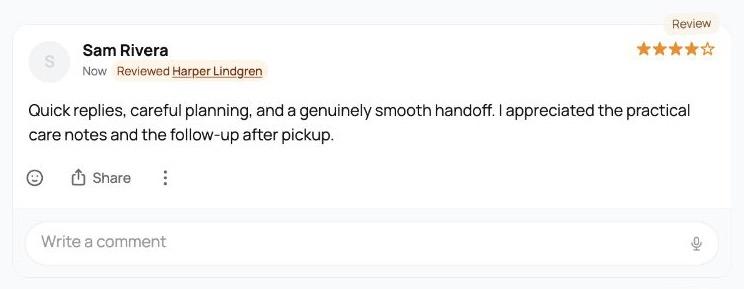
A profile's Reviews tab, with the overall rating and a displayed review


What a single review shows


Every review, whether verified or free-form, displays the same way:


  • A star rating, shown as whole stars. Five star slots, filled in to match the rating. Ratings are always whole numbers, so you will never see a half-star on an individual review.
  • Who wrote it. The reviewer's name and @handle, linking to their profile. A reviewer who has completed identity verification carries a verified marker next to their name, so you can tell the review comes from a confirmed person. (Identity verification is covered in Verifying your identity.)
  • A type marker. A verified review of a completed sale is marked as a Transaction Review, which tells readers it came from a real, confirmed transaction between the two parties. A free-form profile review is marked simply as a Review. The marker is how a reader tells a confirmed-transaction review apart from an open profile review at a glance.
  • A short context line for verified transaction reviews, noting that the review is about that specific sale.
  • The date it became visible.
  • Any photos or video the reviewer attached, shown inline. If there are several, a few are shown with a "more" overlay you can open.
  • Reactions. Anyone can react to a review with an emoji, up to four different reactions per review, the same lightweight way you react elsewhere on Creatures.
  • Comments. A review can have a thread of comments under it. This is how the person who received a review responds to it (more on that in Reviews you receive).


How verified reviews are released (the double-blind window)


Verified, two-party reviews do not appear the instant they are written. They are double-blind:


  • When one side submits, the review is held hidden. Neither party can read the other's review before writing their own.
  • The reviews are revealed in one of two ways: both sides submit, at which point both reviews become visible together and both people are notified, or the 30-day window passes, at which point whatever was written is revealed.
  • The window is timed from when it opens. For an animal sale, that is when the buyer confirms delivery, not the purchase date.


This is what makes verified reviews credible: each one was written without seeing the other, so it reflects a genuine opinion rather than a reaction. Free-form profile reviews, by contrast, are visible as soon as they are posted; there is no hidden window for those.


How the overall rating is calculated


A member's overall rating is the average of their visible reviews, shown to one decimal place out of 5, alongside the number of reviews it is based on, for example "4.8 out of 5" from "23 reviews."


  • Only visible reviews count. A verified review that is still inside its hidden window is not yet part of the average. Once it is released, it is included.
  • Both verified and free-form reviews count. The average blends confirmed-transaction reviews and profile reviews together into a single number, while each individual review still shows its own marker.
  • Organizations and their owners share a reputation. Reviews of an organization and reviews of the people who run it roll up together. A breeder's individual rating and their farm's rating reflect the same body of reviews, so a strong reputation follows the breeder across how they operate. This means a review left for an org is reflected on the owner's profile and the other way around.


Where ratings appear across Creatures


The rating that comes out of all this is not buried on one tab. It shows up wherever it helps a buyer decide:


  • On the profile Reviews tab: the full "X.X out of 5" with the review count and the list of reviews themselves.
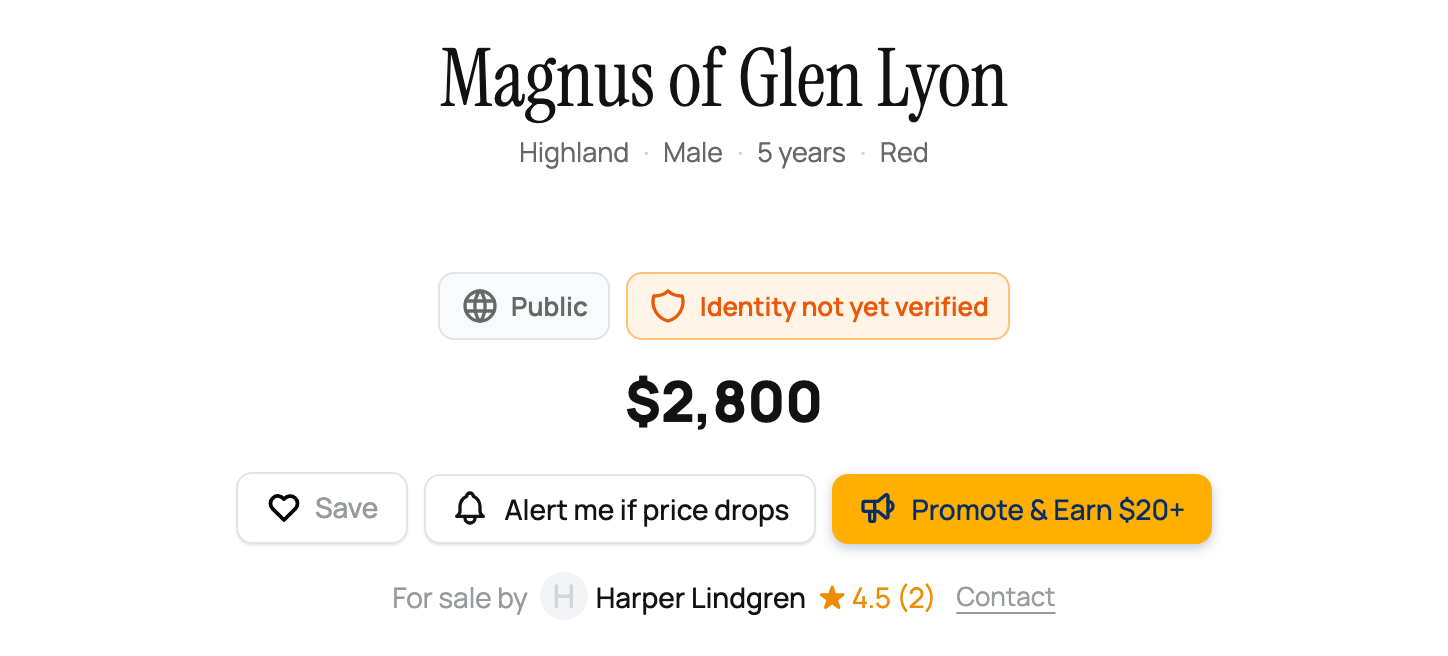
  • On marketplace listing cards: a star and the seller's rating, like "★ 4.8 (23)". A seller with no reviews yet shows New instead of a score, so a brand-new seller is clearly marked rather than looking like a zero. (If you are getting set up to sell, your rating rides along on every listing; see What you need to start selling.)
  • On listing and offering pages: a rating chip for the seller or provider, and the same on booking, genetic, group, and stewardship cards, so the rating travels with the offer.
  • On public breeder websites: a member's verified reviews can appear as testimonials, where a confirmed-transaction review carries a Verified purchase badge, signaling to a visitor that the reviewer really did buy from that breeder.


Reporting a review


Reviews are meant to be honest, not abusive. If a review breaks the rules (it is spam, harassment, or clearly false), anyone can report it for Creatures to look at.


The report-a-review form


  • How: open the review's options and choose to report it. You write a short note explaining what is wrong, in a free-text box, and submit it.
  • What it does: your report goes to Creatures for review. Reporting is a flag for the team, not an instant takedown: a review is not removed just because it was reported, and the team decides what to do.
  • What it is not: reporting is not how you remove a review someone left about you, and it is not how you argue back. To respond to a review you received, you comment on it; reporting is reserved for content that genuinely violates the rules. See Reviews you receive.


For how to leave a review in the first place, see Leaving a review.


Updated on: 23/06/2026

Was this article helpful?

Share your feedback

Cancel

Thank you!