Articles on: Buying

Reporting a problem with your purchase (disputes and the objection window)

Reporting a problem with your purchase (disputes and the objection window)


The moment an animal reaches you is the moment your buyer protection matters most. After a sale, your purchase shows a Handoff panel where you confirm you received the animal, or, if something is wrong, report a problem so your payment stays held while it is sorted out. This article walks that panel, the pickup code, the objection window, and what happens when you report an issue.


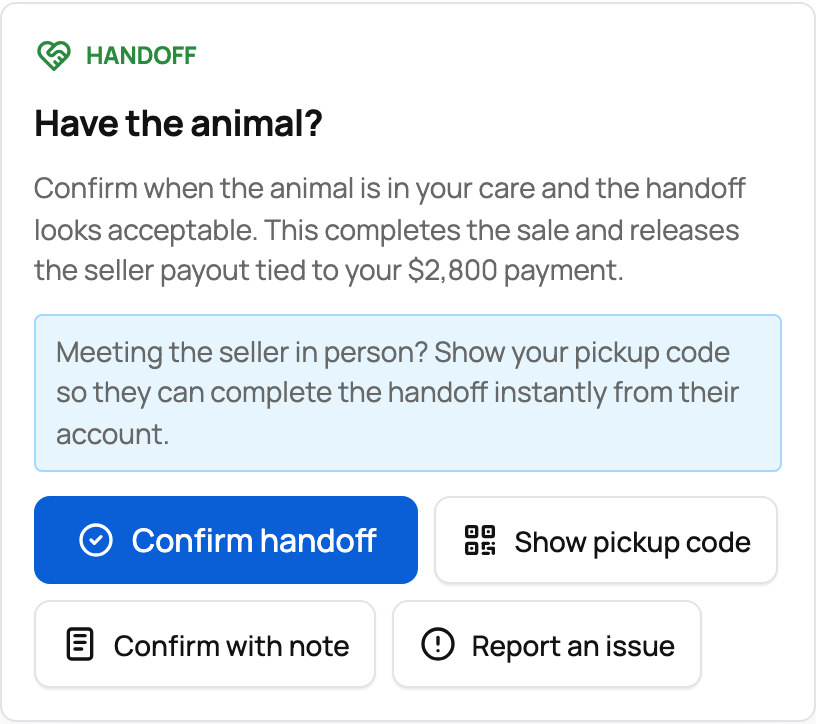
The Handoff panel on a sold listing, buyer view


The Handoff panel


After you pay, your sold listing shows a Handoff panel headed "Have the animal?" It is where the sale is finished. The key line explains what confirming does: it completes the sale and releases the seller's payout tied to your payment. So the panel puts the decision in your hands, exactly when you have the animal in front of you.


It offers a few actions:


  • Confirm handoff: select this once the animal is in your care and the handoff looks acceptable. It completes the sale and releases the seller's payment. Only do this when you genuinely have the animal and it is as described.
  • Show pickup code: for meeting the seller in person (covered next).
  • Confirm with note: the same as confirming, but it lets you record a small, non-blocking note (for example "minor transport scrape noted at pickup") while still accepting the animal.
  • Report an issue: for when something is wrong (covered below). This is the one to use instead of confirming if the animal did not arrive or is not as described.


The pickup code (for meeting in person)


If you are collecting the animal from the seller face to face, you do not have to fumble with confirming afterward. Select Show pickup code and Creatures shows you a 6-digit code and a QR code.


Your pickup code: a 6-digit PIN and a QR code


Show it to the seller at the handoff, and they enter (or scan) it from their own account to complete the sale on the spot. It is a fast, in-person way to confirm: entering your code does the same thing as you tapping Confirm handoff, so the seller is paid and the sale is done the moment you hand over the code. Only share the code once you actually have the animal, because it completes the sale.


Reporting a problem


If the animal never arrived, arrived sick, or is clearly not what the listing described, the most important thing is what you do not do: do not confirm the handoff, because confirming releases the payment. Instead, select Report an issue.


  • You are asked to briefly describe what is wrong (for example "animal arrived visibly sick").
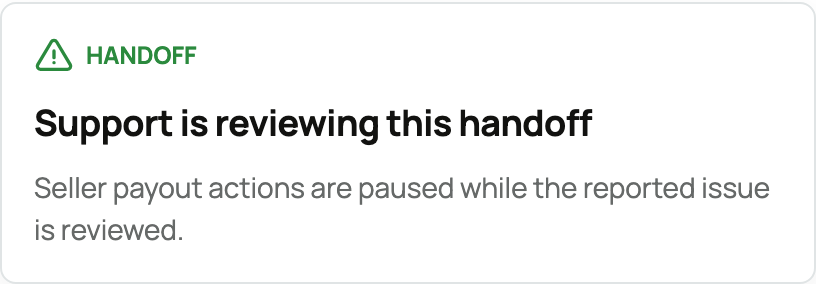
  • Reporting opens a dispute on the purchase and, crucially, pauses the seller's payout. The panel changes to "Support is reviewing this handoff" and notes that seller payout actions are paused while the reported issue is reviewed. (For the seller's side of how that payout is held and released, see How seller payout works.)


A reported issue: support is reviewing and payout is paused


Because the funds were held by Creatures and not yet released, reporting a problem keeps your money protected while the issue is worked out, rather than trying to claw it back after the seller has been paid. Creatures reviews the report and works toward a resolution, which depending on the situation can mean the animal is returned, you are refunded, the sale is cancelled, or, if everything is actually in order, the payment is released to the seller. For health problems specifically, see The health guarantee and if your animal arrives sick.


The objection window


Sometimes the seller marks the handoff as done from their side, for example after they deliver the animal or hand it over. When a seller documents the handoff, your purchase enters a review period called the objection window.


Handoff documented, with an objection window to report an issue


  • The panel shows "Handoff documented" and tells you that the animal is marked as handed off and that you can report an issue before a specific date and time. That deadline is 72 hours (three days) from when the seller documented the handoff.
  • During the window, you can still select Report an issue if something is wrong, which opens a dispute and pauses the payout just as above.
  • If the window passes and you have not reported a problem, the held funds are released to the seller automatically. The window exists so a seller is eventually paid for a completed sale, while still giving you a fair, protected period to speak up.


So the objection window is your safety net on a seller-documented handoff: nothing is released out from under an open problem, and you have three days to raise one.


The states you might see


Your purchase moves through a few clear states, and the Handoff panel tells you which one you are in:


  • Awaiting handoff: paid, waiting for you to confirm you have the animal.
  • Handoff documented: the seller marked it handed off; your 72-hour objection window is running.
  • Under review: you (or the seller) reported an issue, and Creatures is reviewing it. Payout is paused.
  • Complete: you confirmed (or your pickup code was entered, or the window passed), and the seller was paid.


The one rule to remember


Confirming the handoff is the action that pays the seller, so treat it as your green light. If everything is right, confirm (or share your pickup code) and the seller is paid. If anything is wrong, report an issue instead of confirming, and your payment stays held while Creatures helps sort it out. See Receiving your animal and confirming delivery and How buying works for the wider picture.


Updated on: 07/07/2026

Was this article helpful?

Share your feedback

Cancel

Thank you!