Applying to a breeder's program: waitlists and offers
Sometimes the breeder you want is not selling anything right now. A program application lets you raise your hand for a breeder's whole program before a specific litter, hatch, or group exists, so you are already in line when one arrives. It is free, and it is different from applying to buy a listed animal or reserving in a count group (both compared at the end).

Where you apply: the breeder's profile
A breeder who takes program interest shows a Join program waitlist button on their profile page (a personal profile or an organization's). Select it and you land on the application page, headed "Join {breeder} waitlist", with a badge confirming "Program applications open."
Two things worth knowing about that button:
- Only breeders who have opened their program show it. Program intake is a switch the breeder controls, so most profiles do not have the button. No button simply means that breeder is not taking program applications right now.
- The breeder can close intake at any time. If they close it after you applied, your existing application stands and keeps working; the page just stops accepting new ones and reads "Applications closed."
No deposit, no fee
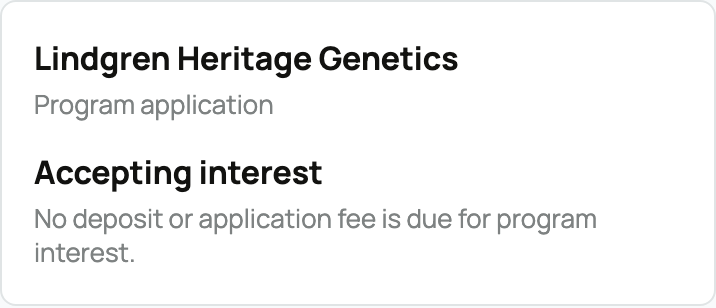
The page says it plainly: "No deposit or application fee is due for program interest." A program application is not a reservation and does not commit you to buy anything. As the page's next-steps panel puts it, "This is not a deposit and does not reserve a specific animal or group." You are telling the breeder what you are looking for, nothing more.
The application form, field by field
Every program uses the standard Creatures program application. First, about you and the home you can offer:
- Your name (required) and Email: your email is prefilled from your account, and you can edit it to use a different address.
- Phone (optional) and Location (city and state): contact and distance context for the breeder.
- Where would the animal live?: the living environment, housing, turnout, or space available.
- Who would share the space?: the people and animals this animal would live or work around.
- Experience with this species: First time, Some experience, Experienced, or Professional. Answer honestly; breeders place animals with first-timers all the time when the rest of the picture is right.
- Preferred timing: now, this season, or flexible.
- Tell the breeder about the care you can offer (required): your daily routine, housing or fencing, care plans, and intended use. This is the answer breeders read closest, so give it real detail.
Then, what you are hoping for:
- Preferred sex: No preference, Female, or Male.
- Color, variety, or markings and Ideal temperament: describe what you want, or leave them as no preference.
- Why are you interested in this breeder's program? (required): your goals, what drew you to this breeder, and what you hope for in a match.
Because this is general interest rather than a claim on a specific group, there is no pick-position and no reservation-tier question here; those belong to count-group applications (see Reserving from a breeder). Select Submit application when you are done. You can have one active application per breeder program at a time; if yours is later matched to a group, you are free to send fresh interest for a future one.
Applying without an account (guest)
You can apply signed out. The same form runs as "Join the waitlist as a guest": fill it out, confirm your email, and Creatures creates your account for you.
- When you submit, Creatures emails you a 6-digit code (the email also carries a secure confirmation link; either works). Enter the code and your application goes to the breeder.
- The code and link are valid for an hour, and you can resend the email if it does not arrive.
- Prefer one tap? The form also offers the usual sign-in providers, which create (or sign into) your account and submit the application in the same step, no code needed. Already a member? Use the Sign in link on the form so the application files under your existing account.
What happens next: accept, waitlist, or pass
The page sets the expectation up front: "{The breeder} can accept, waitlist, or pass on your program interest." You are notified whichever way it goes, and the apply page and your dashboard always show where you stand:
- Application sent (Pending or Screening): the breeder is reviewing your program application.
- Waitlisted: you are on the program waitlist, with a numbered position (next section).
- Accepted: you are in the breeder's accepted pool. The panel is explicit about what that means: "Accepted applications wait for a matching group before any reservation is created." Nothing is owed and nothing is reserved yet. When the breeder has a litter or group that fits, they attach your application to it, and that is the moment a real reservation is created for you.
- Attached: your accepted application has been matched to an actual group, and from there it continues as a count-group reservation. You can send fresh program interest for a future group whenever you like.
- Passed: the card reads "This program was not the right fit right now." (the status shows as Rejected). You can still message the breeder, and apply again later if their intake is open.
A Message breeder button sits on your status card the whole way through, so a question never has to wait for a status change.
Your place in line: "Your waitlist position: #N"
If the breeder waitlists you, your status card shows "Your waitlist position: #N", and the same number appears on your application card at Dashboard, then Applications (the Programs tab shows just these).

- Position #1 is next in line for an offer when a place opens.
- Your number can move. The breeder can reorder their waitlist as they weigh fit, so treat the position as where you stand today, not a fixed promise.
When a place opens: a time-limited offer
When the breeder sends an offer to the top of the queue and it is you, your card flips to "Offer ready": "A program place is ready", with the deadline spelled out: "Respond by {date}. Accept or decline before this offer expires." You are notified, and a Respond to offer button opens the offer page.

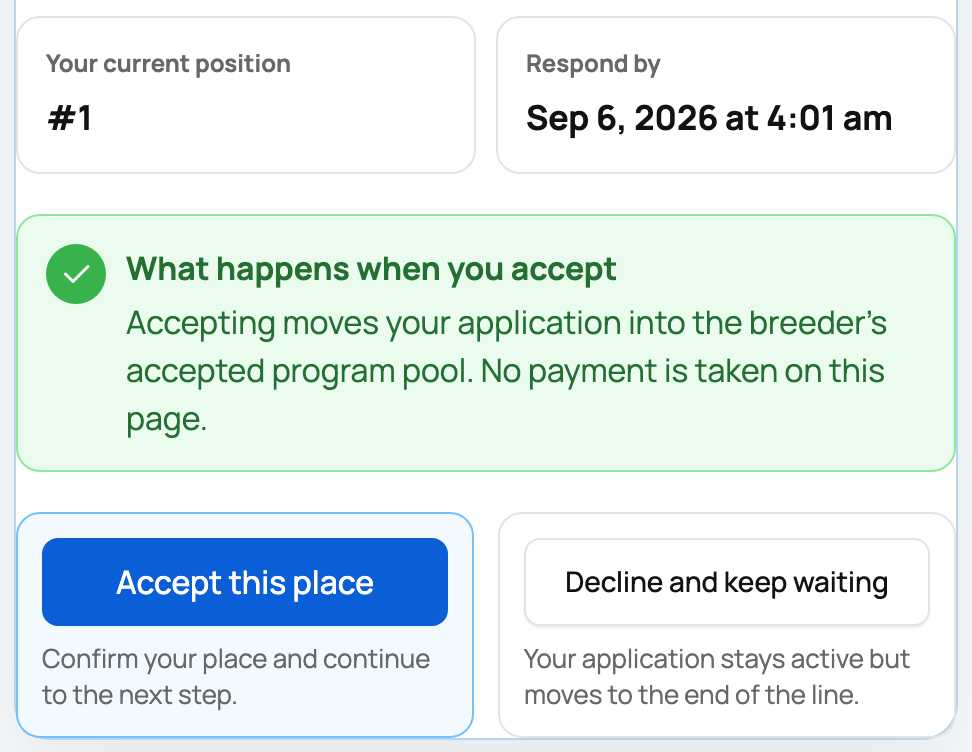
The offer page shows who invited you, your current position, the exact respond-by time, and what accepting does: "Accepting moves your application into the breeder's accepted program pool. No payment is taken on this page."

You have two choices, and an offer runs for 72 hours:
- Accept this place: your application becomes accepted, and you wait for the breeder to attach you to a matching group (as above). Still free, still no payment.
- Decline and keep waiting: you stay on the waitlist, but your application moves to the end of the line. The breeder can still reorder the queue later, so declining is not fatal, just a step back.
If the offer expires unanswered, it is treated like a decline: your place on the waitlist stays safe, but you move to the end of the line, and the breeder's queue moves on to the next person (automatically, when the breeder has auto-advance turned on).
Withdrawing
While your application is pending, in screening, or waitlisted, you can withdraw it from the apply page or from your dashboard card. The confirmation spells out exactly what it costs: "You'll give up your spot in line and any offer that's currently out to you. To rejoin later you'd apply again from the start."
- Withdrawing ends the application (it shows as Withdrawn), and any offer that was out to you is released, so the next person in the queue can get their turn.
- If the breeder's intake is still open, an Apply again button starts a fresh application whenever you are ready. It starts from the beginning, not from your old position.
How this differs from a listing application and a count-group reservation
Three application-shaped things exist on Creatures, and they solve different problems:
- A buyer (listing) application is a per-listing approval gate: a seller requires it before you can buy or bid on a specific listed animal, and approval unlocks that seller's checkout. See Buyer applications: what they are and how to apply.
- A count-group reservation is a claim on a specific upcoming litter or group the breeder has posted, with interest, priority, and specific tiers, and refundable deposits (held by Creatures) on the firmer tiers. See Reserving from a breeder: applications and deposits.
- A program application (this article) is the earliest and lightest: interest in the breeder's whole program, always free, run as a ranked waitlist with time-limited offers. It only turns into a reservation later, if the breeder attaches you to a real group.
Breeders run their side of this from their dashboard: opening intake, deciding each application, ordering the waitlist, and sending the offers. That side is covered in Opening your program to applications and running a waitlist.
Related information
- Reserving from a breeder: applications and deposits
- Buyer applications: what they are and how to apply
- Finding animals: search, filters, and distance
Updated on: 22/07/2026
Thank you!