Articles on: Buying

Keeping your purchase private

Keeping your purchase private


Not every buyer wants their purchase announced. When you buy an animal on Creatures, you can choose at checkout to keep it private. This article explains exactly what that choice does, what it does not change, and the one place the sale still shows up.


The "Keep this animal private" choice at checkout


Where the choice is


On the checkout for a purchase (a fixed-price buy, an accepted offer, a Buy Now, or an auction you won), there is a toggle: "Keep this animal private." Leave it off and the purchase is public like any other; turn it on and Creatures applies privacy to the animal the moment the sale completes. You can also change your mind later from the animal's profile, so this is not a one-way door.


What it hides


Turning it on makes the animal private and quiets the sale, all at once:


  • The animal is set to private. It is hidden from the public marketplace and from your public profile.
  • It is removed from search. The animal no longer appears in marketplace search results.
  • The sold listing page is hidden. The listing's own page returns "not found" to anyone outside the sale, so a shared link will not reveal it. You and the seller keep access for your records.
  • No acquisition post is made. Normally a purchase can post to the community feed ("so-and-so purchased a new animal"); with privacy on, that post is not created.
  • Sale alerts are suppressed. People who had the listing on their watchlist, or a saved search that matched it, are not notified that it sold. The sale does not trigger those outbound alerts.


What stays the same


Privacy changes who can see the animal, not the sale itself:


  • It is still a real, recorded purchase. You own the animal, and the held-funds buyer protection is identical: the seller is still paid only when you confirm delivery.
  • You keep full access. The animal and its records, history, and finances are all yours to manage as normal. Privacy is about the public, not about you.
  • You can undo it. Make the animal public again whenever you like from its profile; the privacy setting is just the animal's normal public/private switch, set for you at the sale.


The one place it still appears: an anonymized comparison


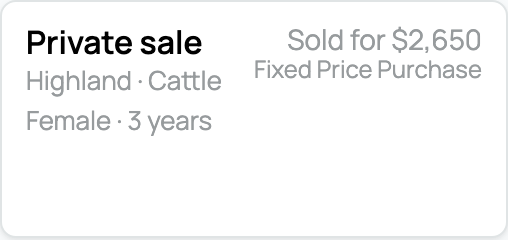
There is a single, deliberate exception. So that the marketplace's recently-sold prices stay honest and useful, your sale still appears in the public recently-sold results as an anonymized comparison.


  • What shows: only the category and the price, the kind of animal and what it sold for.
  • What is hidden: the photo, the animal's name, the seller, the location, and any registry, all stay hidden, and the sold listing page itself is not viewable.


So a private purchase contributes to price history as a "Private sale" data point without exposing the animal or the parties. For how those comparisons look when you are shopping, see Finding animals: search, filters, and distance.


When to use it


Keeping a purchase private is a good fit when you would simply rather not broadcast a new addition, when you are buying a gift or a surprise, or when you prefer to keep your herd's makeup to yourself. It costs nothing, changes none of your protection, and is reversible, so use it whenever public visibility is not what you want.


Updated on: 25/06/2026

Was this article helpful?

Share your feedback

Cancel

Thank you!