
Understand your Wallet activity
Wallet activity combines transactions from your personal Wallet and organizations you own or co-own. Use it to match a balance change to a sale, service, purchase, refund, referral reward, or bank withdrawal.
Read an activity row
On your dashboard, open Money > Wallet and scroll to Wallet activity. Each row shows a date, description, and amount.
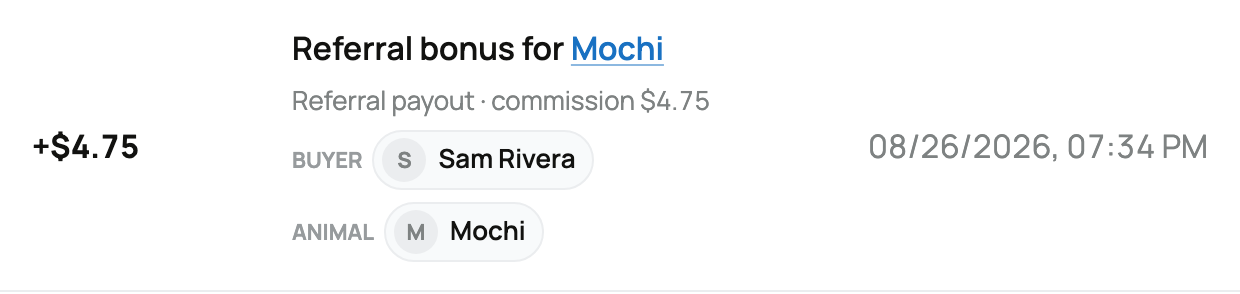
- A plus amount added money to that Wallet.
- A minus amount used or removed Wallet money.
- The description names the animal, buyer, organization, service, or action when that information is available.
The Account picker above changes the displayed balance and withdrawal source, not this history. Use each row's description and any account label to identify the related personal or organization Wallet.
Recognize common entries
Seller proceeds released identifies net proceeds from an animal or genetics sale after its release step. The amount can reflect the seller fee, a seller-funded promo code, or a seller-funded Sale Incentive. The related sale explains the full calculation.
Referral bonus is the promoter's reward from a referred purchase; its summary may say Referral payout. It stays pending until the sale releases, then has an additional seven-day wait before it becomes a completed Wallet payout.
Transport payout, Boarding payment, Genetics storage payment, Stewardship payment, Booking Payment, and Event commission identify earnings from those services.
Purchase means Wallet money helped pay at checkout. Available Creatures Credit is used first, then Wallet money, then the remaining supported payment method.
Withdrawal to bank account records money sent from the Wallet used for that withdrawal. If a transfer is still being confirmed, do not start a replacement withdrawal for the same amount.

A refund, dispute, or adjustment can add or remove money after an earlier transaction. Its own row keeps that change separate from the original sale or purchase.
If the balance does not look right
Compare the row's date, amount, and name with the related sale or service. Remember that buyer payment and seller release are different moments. If you still cannot identify a change, contact Support with the Wallet account name, date, amount, and description. Do not send another payment or withdrawal just to make the balance match. For sale timing, read How seller payout works; for bank transfers, read Withdrawing your money to your bank.
Related information
Updated on: 03/09/2026
Thank you!