
Your Creatures Wallet: balance, holds, and getting paid
Your Creatures Wallet holds money you earn through Creatures. Available Wallet money can pay for an eligible purchase or move to a connected bank account. Creatures Credit is different: it can pay for eligible purchases, but it cannot be withdrawn.
Check the right Wallet
On your dashboard, open Money > Wallet. If you own or co-own an organization that has Wallet activity, use Account to choose between My Personal Wallet and the organization. The large amount changes to the selected account.
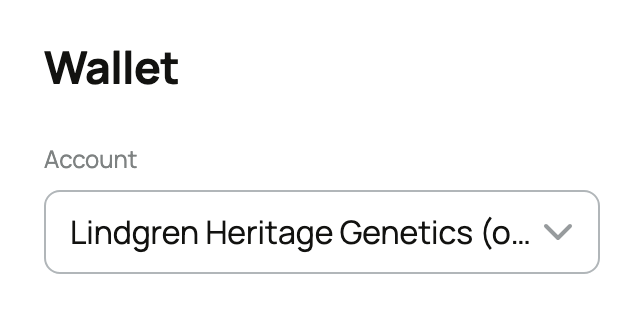
Each Wallet keeps its own balance. Choosing an organization lets you view and withdraw that organization's money; it does not move the money into your personal Wallet. Marketplace checkout uses the signed-in member's personal Wallet. Creatures initially shows the Wallet with the largest balance, so check Account before relying on the amount.
The Wallet activity list below combines your personal history and activity for organizations you own or co-own. Changing Account does not filter that list.
Understand the available balance
Money appears after the step that releases it. For an animal sale, that is normally the completed pickup, handoff, or tracked transport path shown in the sale. Service and event earnings follow the completion rules for that service. A successful checkout can therefore exist before the seller's money is available.
Your seller fee and any seller-funded promotion are taken into account before net sale proceeds reach the Wallet. For the complete animal-sale timeline, read How seller payout works.
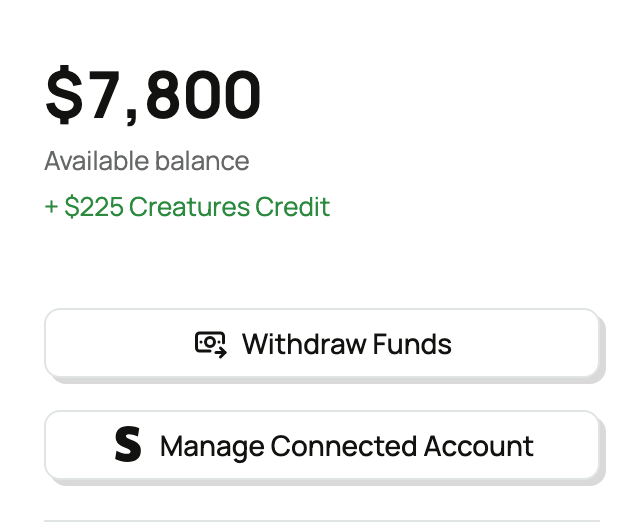
The smaller Creatures Credit amount belongs to your personal account, even when an organization Wallet is selected. Credit can pay for eligible purchases but cannot be sent to a bank. Read Creatures Credit: what it is and how it is spent for its activity and checkout order.
Know what can pause a withdrawal
A Wallet has a one-time seven-day withdrawal waiting period starting with its first transaction. An open payment dispute, an identity check, or an incomplete payout account can also pause withdrawals. The balance remains visible while a check is open.
A refund or payment dispute can make a Wallet negative. New earnings first reduce that amount, and withdrawals remain paused until the balance is no longer negative. When the amount owed is at least $0.50, Settle now may let you clear it by card; a smaller amount clears from future earnings.
When the selected Wallet has available money and its checks are complete, choose Withdraw Funds. If the page shows Set up payouts instead, connect a payout account first. The next guide explains the source Wallet, bank destination, and every check shown before money moves.
Related information
Updated on: 03/09/2026
Thank you!