
Designing your website: layouts, colors, and the AI restyle
Designing your website: layouts, colors, and the AI restyle
The Design panel in the builder controls how your site looks: its overall shape, its top banner, its colors and type, and which details show on your animal cards. This guide walks every control, what each value does, and what choosing it means for visitors. None of it touches your content; design and content are separate, so you can restyle without rewriting anything.
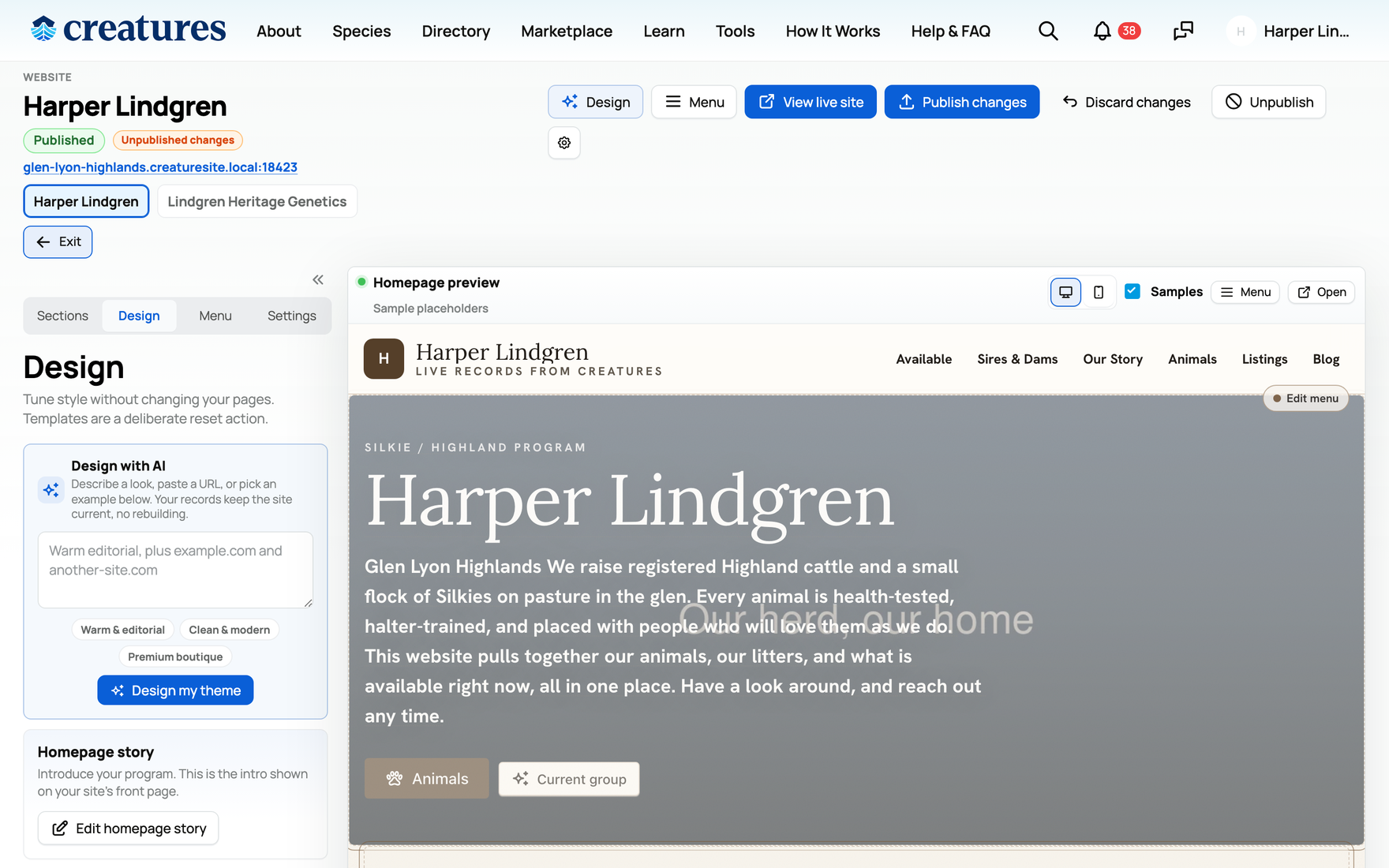
Layouts (the overall shape)
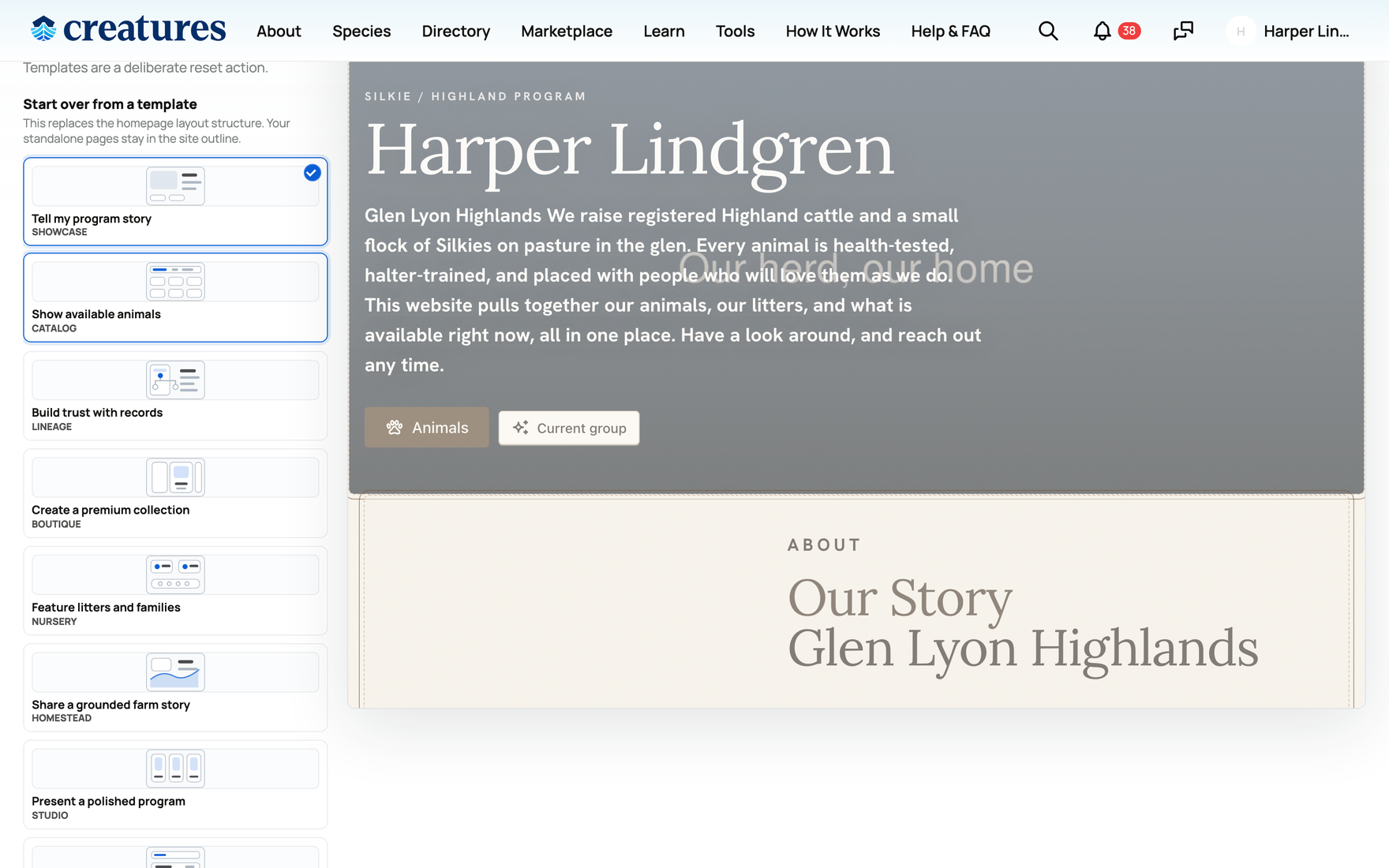
A layout is a whole design preset that sets your homepage structure and visual voice in one choice. The picker is a list of labeled thumbnails, each with a short descriptor, and there are nine:
- Showcase: an editorial telling of your program's story. This is the default.
- Catalog: scan-friendly availability cards, for when the point is "here is what is for sale".
- Lineage: pedigree, health, and trust-forward, leading with proof and records.
- Boutique: a premium lookbook feel for a polished, high-end presentation.
- Nursery: built around litters, clutches, and families.
- Homestead: a grounded farm or ranch feel.
- Studio: a polished show or performance program look.
- Practice (labeled "Services" in the picker): services-forward, for training, boarding, or tours.
- Rescue: an adoption, foster, or sanctuary shape.
Picking a layout resets your homepage section arrangement to that layout's shape. Your pages and your content are preserved; only the homepage's arrangement of sections changes to match the new layout. So you can try layouts freely without losing what you wrote.
Hero style (the top banner)
The hero is the banner at the very top of your homepage. The hero style controls how it is composed, with three choices:
- Split: the image sits beside the text. A balanced, classic header.
- Banner: a full-width image with the text laid over it. Bold and photo-led.
- Spotlight: centered and image-forward, with the photo as the focus.
Each layout comes with a sensible default hero style, and you can override it to any of the three.
Color, density, and fonts
- Accent color: a single hex color used for buttons and links across the site. Pick one that fits your brand; it is the splash of color a visitor's eye follows to the things they can click.
- Density: the spacing rhythm of the whole site, either comfortable (more breathing room, a relaxed feel) or compact (tighter spacing, more on screen at once). Choose comfortable for an airy, premium feel, or compact when you have a lot to show and want less scrolling.
- Fonts: you can set a heading font, a body font, and a mono font, each chosen from an approved font list. They set the typographic voice. The approved list keeps everything legible and on-brand, so any combination you pick will render cleanly.
Animal cards and record teasers
Your animals appear on the site as cards, and you decide how much each card reveals. Two sets of toggles control this:
- Card fields: which animal details show on a card. You can turn on or off name, sex, color, variety, grade, age, label, price, title, and registry. Turning one on shows it on every animal card; turning it off hides it. The implication: show the fields that help a buyer decide (price, age, registry) and hide the ones that add clutter for your audience.
- Record teasers: which record summaries appear, namely a pedigree teaser, health, genetics, and COI (coefficient of inbreeding). On means a small preview of that record shows on the animal; off means it does not. Use these to lead with proof if records are your selling point, or keep them off for a cleaner, simpler page.
These are display choices for the website only. They do not change the underlying animal records; they just decide what a website visitor sees.
Restyle with AI
The Design panel includes a Restyle box: a prompt where you describe the feeling you want, and Creatures suggests a coordinated look.
- What you type: a short description, up to roughly 700 characters, such as "warm and editorial" or "clean premium boutique".
- What it returns: a suggested layout, hero style, accent color, and density, with a one-line rationale for why it fits. You can accept the suggestion or ignore it.
- What it will and will not do: it only ever picks from Creatures' built-in design system. It does not write custom CSS or invent new components, so the result always renders correctly and stays on-brand. It is also rate-limited, so it is meant for occasional use, not rapid-fire retries.
- Set the right expectation: Restyle is a fast starting point, not a from-scratch website generator. It gets you to a coherent look quickly, and you fine-tune the individual controls above from there.
Design edits stage as a draft
Every design change you make stages into your draft. The public site does not change the moment you pick a new layout or color; visitors keep seeing the current live version, and the builder shows the "Unpublished changes" pill. Your new look goes public only when you Publish changes (or is thrown away if you Discard changes). The full loop is covered in Adding photos, then publishing and updating your site.
One thing the Design panel does not set is your site's name: your website's brand and hero use your account display name, which you set on your Creatures profile. To get that (and the avatar and bio your site draws from) right, see Setting up your profile.
Related information
- Your Creatures website: what it is and how to open the builder
- Building pages, sections, and posts
- Choosing what the public sees: animals, listings, the menu, and visibility
- Adding photos, then publishing and updating your site
Updated on: 22/07/2026
Thank you!