
Building pages, sections, and posts
Building pages, sections, and posts
This article is about structure: the pages your site is made of, the sections you stack onto a page, the content blocks inside your story, and the posts you publish to your blog. Records-backed parts (your animals, groups, and records) pull live from what you already have on Creatures, so building a page is mostly arranging and writing, not re-entering data.
Pages and page types
Your site has a home page plus any number of additional pages. There are three page types:
- Story: the long-form "about" or "our program" page, written as a freeform body of content blocks. There is exactly one story page per site (it is a singleton). This is where you tell your program's story in your own words.
- Custom: extra pages you add, such as "Available", "Sires and dams", or "Our process". A custom page is built from sections and lives at
/p/{slug}. Add as many as you need. - Contact: a contact page type for how to reach you. It starts with the contact section and its inquiry form, covered below.
Starting a custom page from a template
When you add a custom page, you can start it from a template so it is not blank:
- available_animals: a hero plus your for-sale animals. Good for an "Available" page.
- sires_dams: a hero plus sire and dam showcases. Good for showing your breeding animals.
- group: a hero plus one featured group or litter. Good for a single litter or clutch page.
- about: a hero plus a writing block. Good for a secondary "about" style page.
- blank: an empty page you build up yourself.
- contact: a contact page, starting with the contact section (inquiry form on).
Per-page fields, and what each one means
Every page has the same set of fields:
- Title: the page's name, shown in navigation and at the top of the page.
- Slug: the page's web address piece, auto-made from the title, lowercase letters, numbers, and hyphens, and unique on your site. For a custom page the public URL is
/p/{slug}, so the slug is literally the page's address. You can edit it; changing it changes the page's link. - Status: one of draft (a work in progress, not public), published (public), or archived (retired). Only published pages appear on your live site, so a page you are still building stays out of sight until you set it to published.
- Visibility: one of public (anyone), creatures_only (only signed-in Creatures members), or private (only you, for staging). On your public subdomain, only public pages show. (Visibility is covered in depth in Choosing what the public sees.)
- Sort order: the order pages sit in. You can reorder pages, which drives how they line up.
Remember the story page is a singleton: there is one, and you cannot add a second story page.
Sections (the building blocks of a page)
Pages other than the story page are composed of sections stacked in an order you control. Each section renders a styled band on the page. The built section types are:
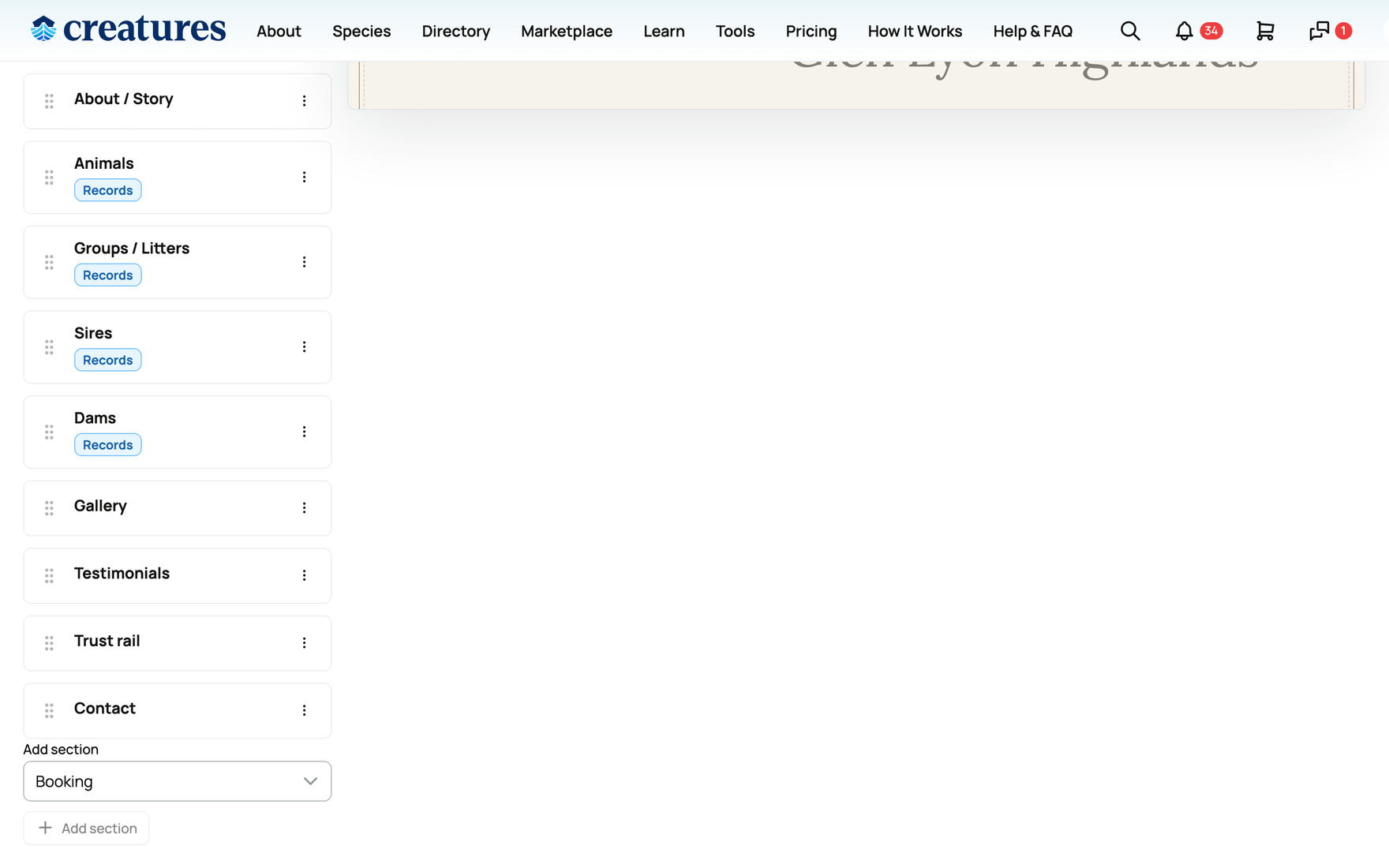
- hero (the top banner), about (a story or standards block), animals (a grid of your animals), group (a litter or group card), pedigree, health, gallery, services, booking (an embedded booking widget for one of your bookable offerings), process, support, contact (how a visitor reaches you, with an embedded inquiry form by default), application (your program's application form), trust_rail (a strip of trust signals), testimonials, sire_showcase, dam_showcase, content (freeform blocks), and association_directory (a verified-member directory, for breed associations).
You add, reorder, and remove sections to shape a page. Four of them are singletons, meaning one each per page: hero, trust_rail, contact, and application.
Most of these you place yourself from the Add section picker. Three are worth calling out:
- Booking puts a live booking widget on the page. Pick one of your active bookable offerings and the section embeds that offering's "Book now" widget, so a visitor can request a time without leaving your site. You set a heading and an eyebrow for it, and choose the offering from a dropdown (only your own active offerings appear there). Building the offering itself is done in your booking tools; this section just surfaces it. To put the same booking widget on a website you host elsewhere (Squarespace, Wix, WordPress), see Sharing and embedding your bookable offering on your website.
- Application embeds your program's application form, and it appears to visitors only while your program applications are open; until then, the builder shows a reminder to open intake first and the section stays off your public pages.
- Association directory is a special case you do not add from the picker. It appears automatically on a breed association's website when that association runs its member hub on Creatures, and it lists the association's verified members in good standing, each linking to their profile. If you are a breeder rather than an association, you will not place this one yourself.
Section settings, with their values
Some sections have settings that change what they pull or show:
- animals: a focus of all, for_sale, or featured (which animals to pull), and a count from 1 to 24 (default 4). The implication: point an animals section at your for-sale animals on an "Available" page, or at featured animals on a homepage.
- group: a count from 1 to 12 (default 1), for how many groups or litters to show.
- gallery: a count from 1 to 24 (default 8), for how many images to show.
- testimonials: a heading (up to 60 characters) and a count from 3 to 9 (default 6).
- booking: the offering to embed (chosen from your active bookable offerings), a heading (up to 70 characters, default "Book a visit"), and an eyebrow (up to 40 characters, default "Booking").
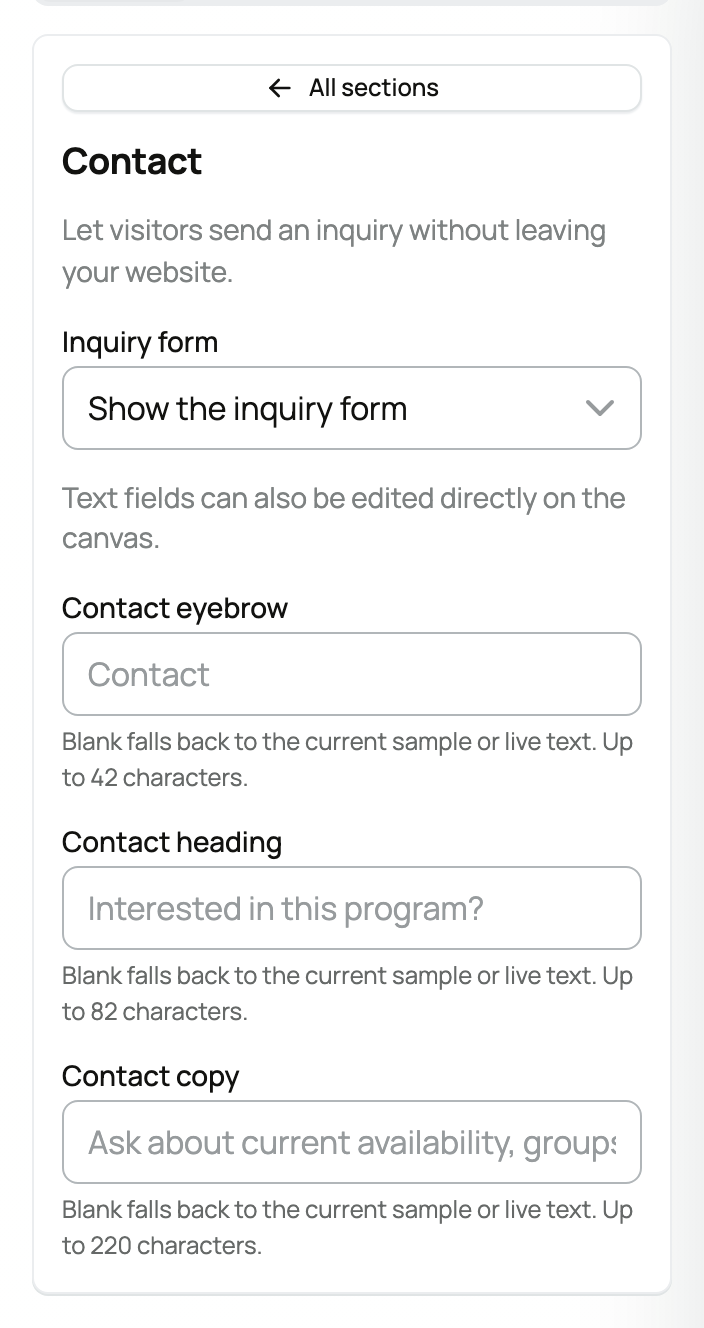
- contact: one Inquiry form choice, either Show the inquiry form (the default) or Show the contact button only. What each one means is covered just below.
- sire_showcase and dam_showcase: a heading, a kicker (an eyebrow line, default "Breeding program"), and a count from 1 to 12 (default 8).
Most sections also expose editable inline text: a kicker line, a headline, and body copy you can rewrite in place. If you leave them, they default to sensible, layout-appropriate wording.
The contact section and its inquiry form
The contact section is how a visitor reaches you, and its one setting, Inquiry form, decides what they see:
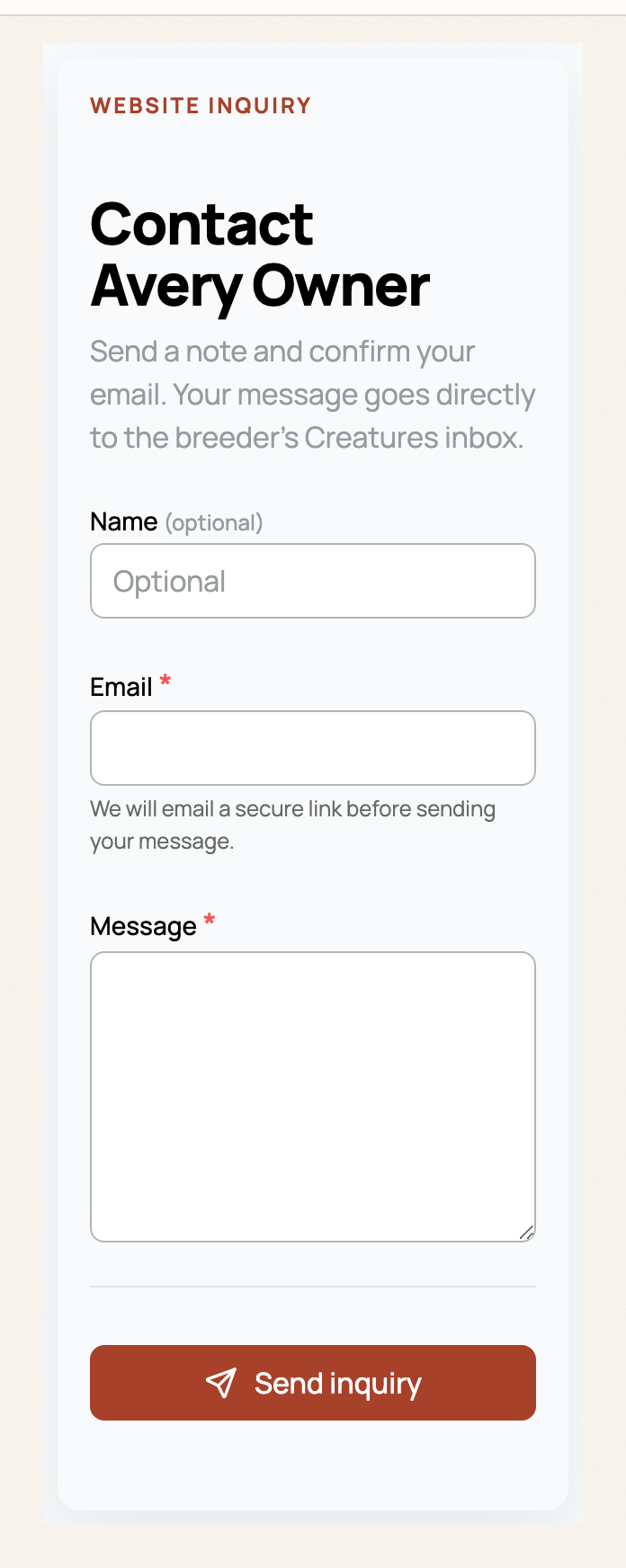
- Show the inquiry form (the default): the section embeds a short inquiry form right on your site, so a visitor can write to you without leaving your website and without having a Creatures account. The form has three fields, Name (optional), Email, and a Message of up to 5,000 characters, and a Send inquiry button.
- Show the contact button only: no embedded form; the section shows a contact button that takes the visitor to your Creatures profile to start the conversation there instead.
Here is what happens when a visitor sends the form:
- They confirm their email. Creatures emails the visitor a secure confirmation link (it expires after an hour), and the message is only sent once they open it. That one step keeps bots and mistyped addresses out of your inbox.
- The inquiry arrives in your Creatures inbox as a chat, labeled Website inquiry, so website leads are easy to tell apart from your listing and animal conversations. You reply there like any other message; chats themselves are covered in Messaging other members.
- The sender gets an account to reply from. If their email already belongs to a Creatures member, the message simply comes from that account; otherwise Creatures creates a light guest account for them. After confirming, they land straight in the conversation, so your answer reaches a real, reachable person.
You do not need to set any of this up: a brand-new site's homepage already includes a contact section, and the Contact page template starts with one too, both with the inquiry form on.
Records-backed sections pull live
The sections that draw on your data (animals, group, pedigree, health, sires and dams) pull live from your existing animals, groups, and records. If you do not have the relevant data yet, the builder shows a small "no animals yet" prompt in that section instead of an empty band, so the page never looks broken.
Content blocks (inside the story body and content sections)
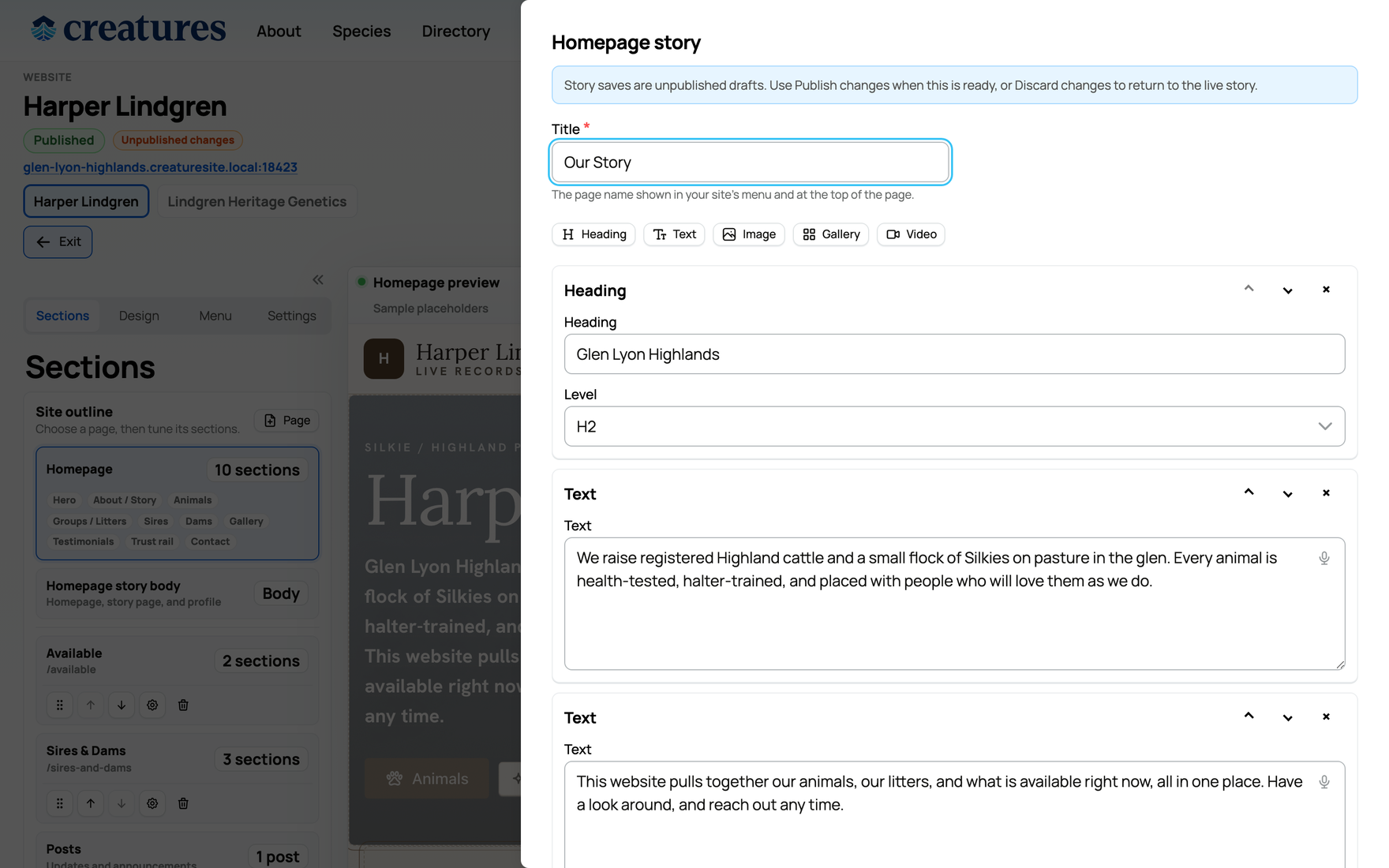
The story page body, and any content section, are built from blocks. The block types are:
- Heading: a section heading at level 2, 3, or 4, up to 180 characters. Use levels to structure a long page.
- Text: a paragraph, up to 12,000 characters, with optional bold, italic, and links. This is the workhorse for writing.
- Image: one image with an optional caption.
- Gallery: several images with a caption.
- Video embed: a video by its URL.
Treat the character limits as practical room rather than targets. They are generous, so write naturally and break long pages up with headings.
Posts (your blog)
You can publish posts that appear on your public site at /blog and /blog/{slug}. You create one from the Post button in the builder. Each post has:
- a title and a slug (its
/blog/{slug}address), - an excerpt (the short summary in the blog list),
- tags, a hero image, and a body of the same blocks above,
- a status (draft, published, or archived) and a visibility (public, creatures_only, or private).
Be clear on what this is: a lightweight way to share updates and news, not a full blog content-management system. There is no separate posts dashboard with scheduling. You write a post and publish it, and it shows on your /blog page. If you list animals for sale and want a post or page to surface them, an animals or listings section is the better tool; for how listings get onto the site at all, see Choosing what the public sees, and for selling itself, Listing an animal at a fixed price.
Content edits stage as a draft
Like design, content changes stage into your draft. Adding a page, reordering sections, or editing a block does not change the public site until you Publish changes. The "Unpublished changes" pill tells you a draft is waiting. The full publishing loop is in Adding photos, then publishing and updating your site.
Related information
- Your Creatures website: what it is and how to open the builder
- Designing your website: layouts, colors, and the AI restyle
- Choosing what the public sees: animals, listings, the menu, and visibility
- Adding photos, then publishing and updating your site
Updated on: 22/07/2026
Thank you!