Articles on: Selling

Listing an animal at a fixed price

Listing an animal at a fixed price


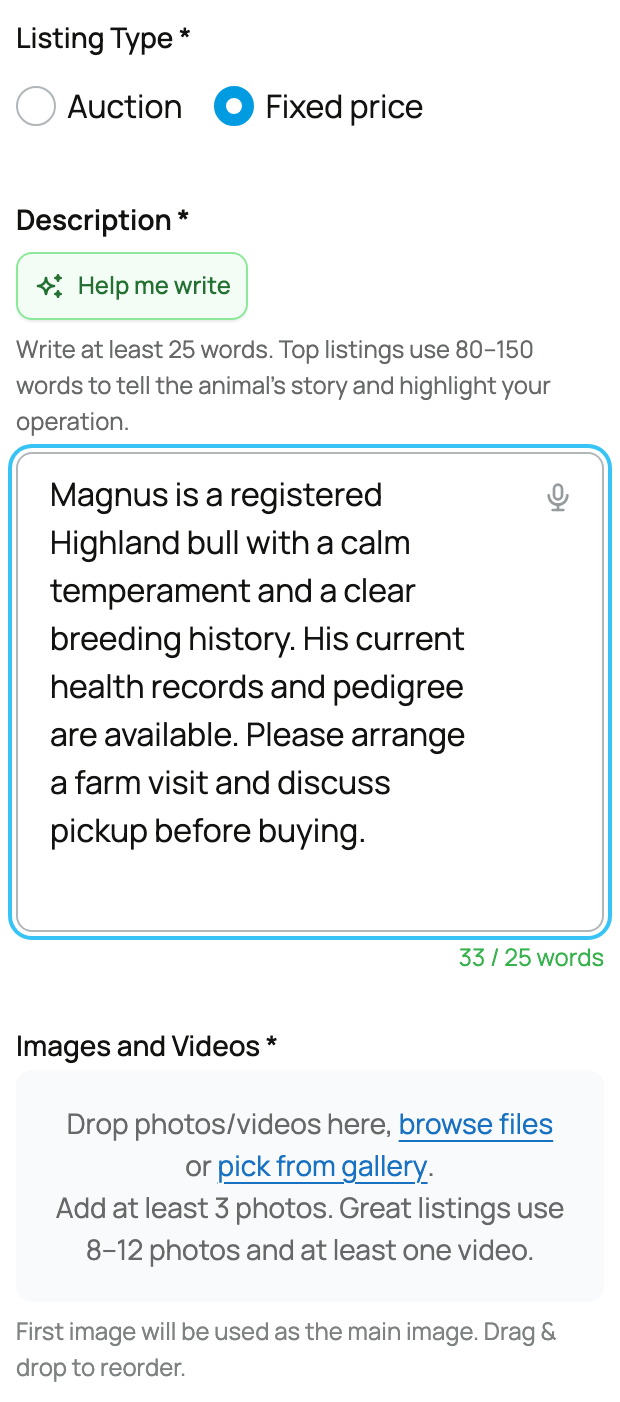
A fixed-price listing sets one price with a Buy button: no bidding, no clock. This guide walks every field on the create form so you know exactly what each one does and what choosing it means, then the manage view you use after it is live.


The fixed-price create-listing form


The animal and its photos


  • Select Animal: the animal you are selling, chosen from your animals. It pulls in the profile and photos buyers will see, so the profile should be complete before you list.
  • Photos (at least 5 required): a listing needs a minimum of five photos. Clear, honest photos are the single biggest driver of a sale, and the minimum is there to make sure buyers can actually see what they are buying.
  • Description (at least 50 words): the write-up of the animal. The form asks for at least 50 words and notes that the strongest listings run 80 to 150. The implication: thin descriptions convert poorly and are blocked below the minimum, so describe temperament, history, and what is included.


Price


  • What it is: the amount you are asking for the animal. Range is $1 to $999,999.99.
  • What it means: with fixed price this is what the buyer pays for the animal itself. The 5% buyer fee and any add-ons are added on top at the buyer's checkout, so your asking price is the clean animal price.
  • Not sure what to ask? A Crestimate gives you a data-driven value to anchor your price to. See Showing a Crestimate and using it for pricing.


Require buyer approval (optional)


  • What it is: a checkbox, "Require buyer approval." When on, buyers must be approved before they can buy.
  • Buyer Application Form: when approval is on, you pick a form (or build one) of questions buyers answer. See Requiring buyer applications and building a form.
  • What it means: off, anyone can buy immediately; on, the Buy button is locked for a buyer until you approve them. Use it when you care who the animal goes to.


Offer boarding (optional)


If you can house the animal for the buyer for a while after the sale, you can offer boarding:


  • Offer boarding services with this listing: the master toggle that reveals the boarding options.
  • Select Boarding Service: which of your boarding services applies (its title and monthly rate show). You set up the service once and reuse it.
  • Boarding is required as a condition of sale: makes boarding mandatory rather than optional for this sale.
  • Minimum commitment for this listing: when boarding is required, the minimum term (1 to 12 months) for this specific listing.
  • Include complimentary boarding period: lets you bundle in a number of free boarding months as a perk.
  • What it means: boarding lets a buyer who cannot collect right away pay you to care for the animal in the meantime, and the chosen term's cost is added to their total at checkout.


Offer optional delivery (optional)


  • Offer optional delivery with this listing: turns on seller delivery and reveals its pricing.
  • Rate ($/mi): what you charge per mile of delivery.
  • Minimum Charge (optional): a floor on the delivery fee regardless of distance.
  • Maximum Distance (miles): the furthest you will deliver (1 to 5000). Beyond it, delivery is not offered.
  • What it means: if you offer delivery, the buyer can add it at checkout and its fee is added to their total, calculated from distance, your per-mile rate, and your minimum.


Location


  • Address: where the animal is. Creatures uses it to measure distance for buyers searching nearby and for delivery pricing. You can save the location for reuse.
  • What it means: an accurate location is how local buyers find you and how delivery is priced, so set it correctly.


Sale Incentives


Two optional boosts can help your listing sell faster. They are covered in depth in Promoting your listing and seller bonuses:


  • Cover the Buyer's Service Fee: you absorb the buyer's 5% fee instead of the buyer. Your listing then shows "No Buyer Fees", and that 5% is deducted from your payout.
  • Boost your Promoter's Earnings: raise the reward for members who promote your listing, paid from your proceeds, to attract more promotion.


Agree to the terms


  • What it is: a required checkbox confirming you agree to the marketplace terms.
  • What it means: you cannot publish without it, and it is your acknowledgement of the seller terms for the sale.


After it is live: the manage view


Once published, you manage the listing from its own page.


Your listing's manage view


From here you can edit details, share the listing, see watchers and offers, and track the sale once a buyer commits. When a buyer checks out, the sale moves into the protected flow: their payment is held by Creatures and reaches your Wallet only after the buyer confirms delivery. See What happens after I sell an animal?.


Updated on: 23/06/2026

Was this article helpful?

Share your feedback

Cancel

Thank you!