Articles on: Finance & Accounting

An animal's finances and ROI

An animal's finances and ROI


Every animal has a Finance tab showing the money tied to it: what it cost, what it has earned, what has been spent on it, and how it is doing. It is written in plain language, so you do not need accounting terms to read it.


Open it


On an animal's profile, choose Finance. The page lives at /animal/{handle}/finance. From here you can also Add money connected to this animal, or open Advanced entry for a detailed transaction.


An animal's finance tab


The headline numbers


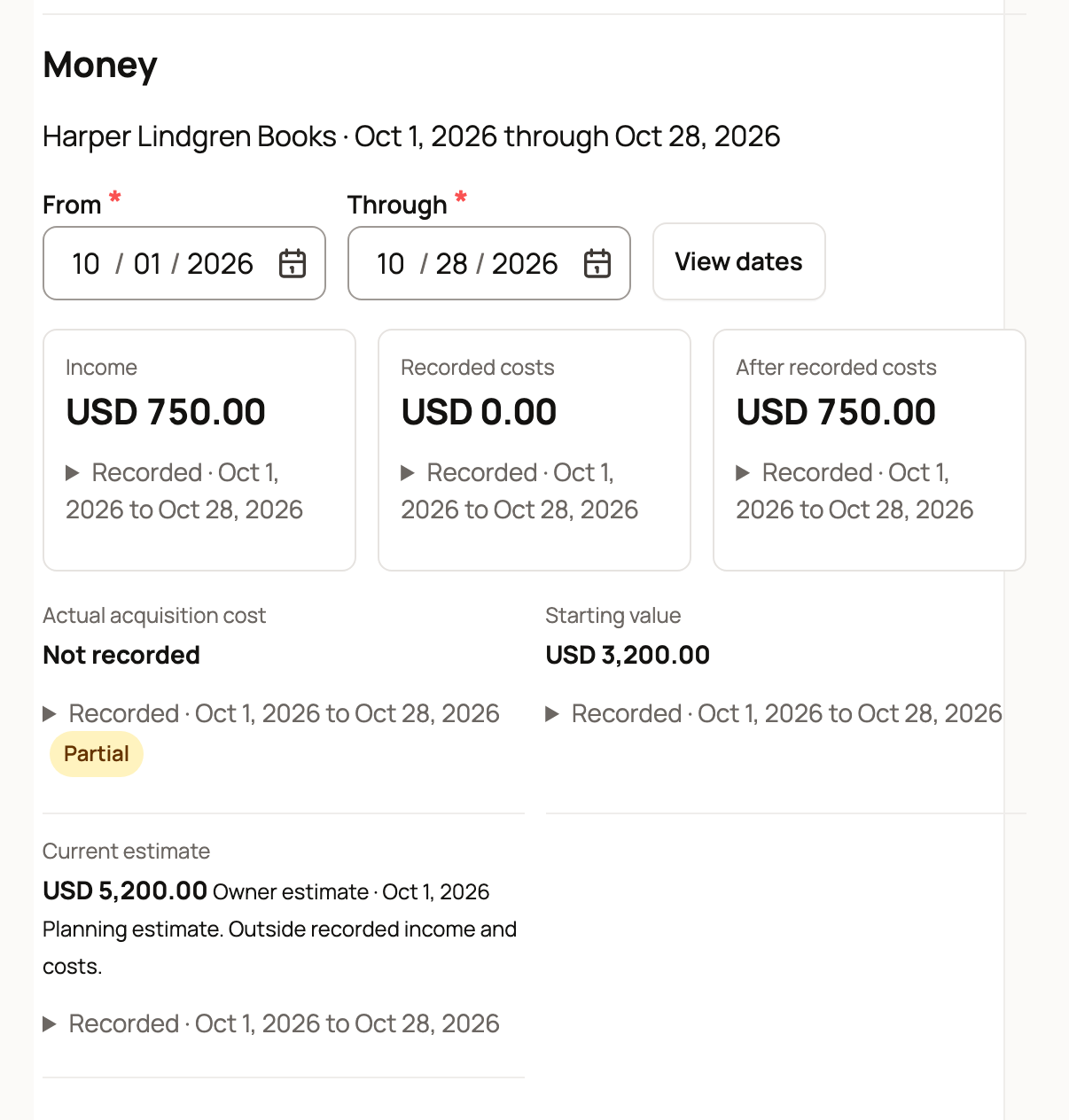
A row of figures summarizes the animal, each with a one-line explanation on the tab:


  • Income: sales, breeding fees, or other income linked to this animal.
  • Expenses: feed, vet bills, transport, or other expenses linked to this animal.
  • Purchase price or Starting value: the original value you recorded. It is labeled Purchase price for a purchased animal and Starting value for one bred or born in your program. It appears once you have recorded a value.
  • Remaining starting value: the part of that purchase price or starting value that has not yet been applied to a sale or write-off. As an animal is partly sold or written down, this shrinks.
  • Profit so far: income minus expenses linked to this animal, shown in red when negative and green when positive. Note that this profit compares income to expenses; it does not subtract the animal's cost basis, which is what the purchase price and remaining value figures are for.


These numbers only reflect entries you connected to this animal, so connecting income and expenses as you record them is what makes the tab accurate. See Recording money in and out. To weigh this return against what the animal is worth on the market today (rather than what you have into it), a Crestimate gives a data-driven market value; see What is a Crestimate?.


The estimated value panel


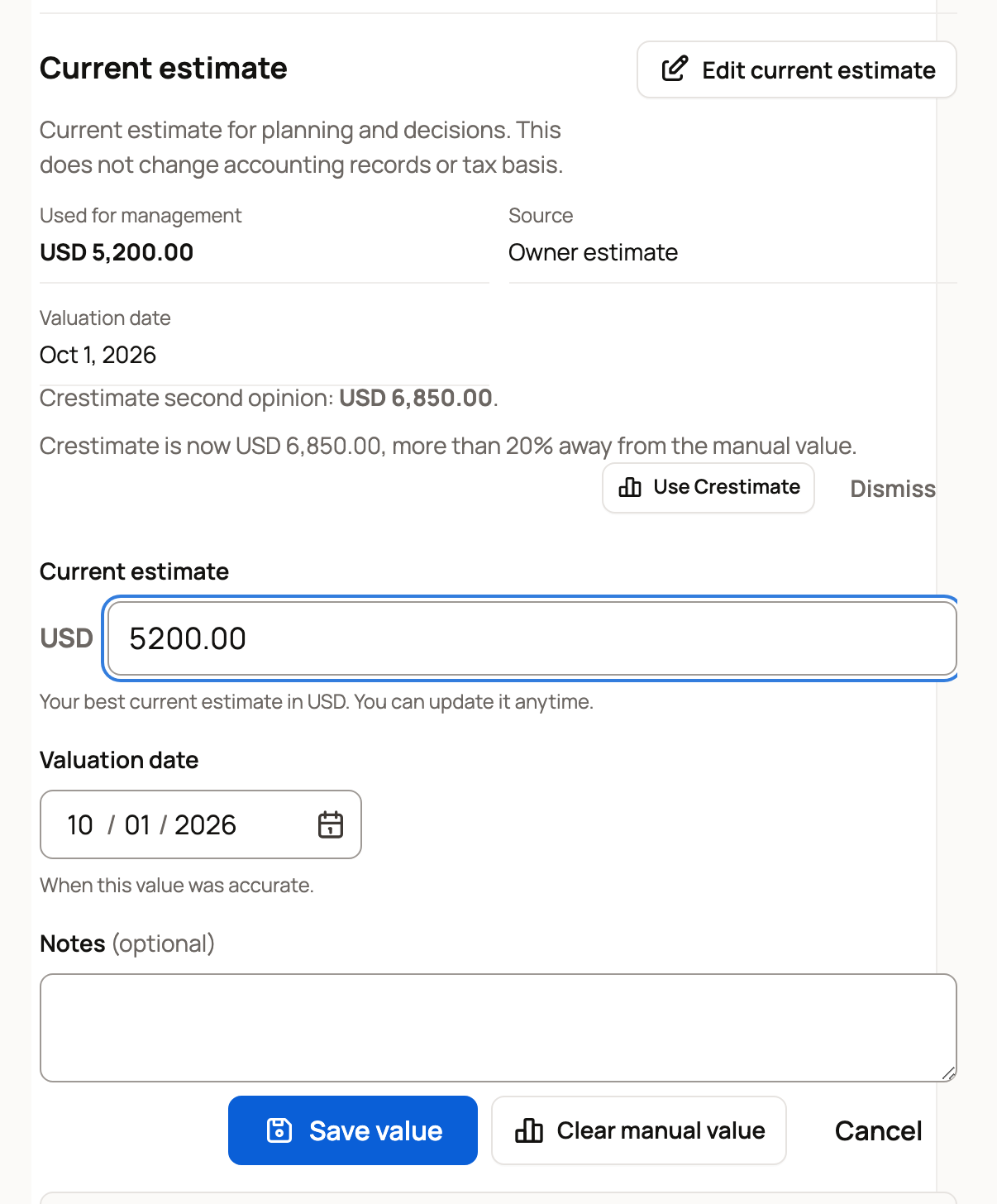
The Estimated value panel on the Finance tab is where you set and check what this one animal is worth for management. It is clearly a planning view: a line reads "Management value for planning and decisions. This does not change accounting records or tax basis," and a closing note repeats that estimated market values do not change your accounting records, inventory lots, depreciation schedules, or tax basis.


  • Used for management: the single value Creatures is using for this animal right now. Source tells you where it came from:
    • Manual value: a value you set by hand, which always wins.
    • Crestimate: Creatures is using the latest eligible Crestimate because you have not set a manual value.
    • Cost basis: no manual value and no usable Crestimate, so it falls back to what you paid or recorded.
    • Not set: none of the above is available yet, so there is nothing to show until you add one.

When the source is a Crestimate, the panel also shows its Confidence, and when you set a value by hand it shows the Valuation date you chose.

  • Set or edit the manual value: if you can edit this animal's records, a Set manual value button (or Edit manual value once one exists) opens a small form for the amount, a valuation date, and optional notes. Saving makes that your management value. See the inline editing section below.
  • Crestimate second opinion: when a usable Crestimate exists and it is not already your management value, the panel shows it as a "Crestimate second opinion" so you have a market figure to compare against. If no Crestimate has been generated yet, it says so, and if the latest one has too little comparable data to apply automatically, it tells you that and invites you to review it or set a value by hand. For what a Crestimate is, see What is a Crestimate?.
  • The 20% drift nudge: if your manual value drifts more than 20% away from the latest Crestimate, the panel flags it ("Crestimate is now $X, more than 20% away from the manual value") and offers a one-click Use Crestimate action to adopt the Crestimate figure, or Dismiss to keep your number. This is only a prompt; nothing changes unless you choose to.
  • Show this on your active listing: when the animal has an active marketplace listing you can change, a Show this on your active listing button publishes the Crestimate onto that listing so buyers can see it. It only affects what shows on the listing, not your books. For what a Crestimate is and how it appears on a listing, see What is a Crestimate?.


Setting or changing the management value here never touches your accounting records, inventory, depreciation, or tax basis; it only changes the planning figure Creatures shows for this animal.


Setting and clearing the value inline


The Estimated value panel lets you edit right on the Finance tab, without leaving the page:


  • Set a manual management value: choose Set manual value (or Edit manual value), enter the amount, a valuation date, and optional notes, and save. Your figure becomes the management value and the source changes to Manual value.
  • Clear it back to Crestimate or cost basis: once a manual value is set, a Use Crestimate or cost basis action removes it, so the source falls back to the latest eligible Crestimate, or to cost basis if there is no usable Crestimate.


This inline editing is only for the management value. To set or correct what you actually paid for the animal (its cost basis), see the cost-basis section below and Animal cost basis and starting values.


The animal's setup


The tab also shows how the animal is classified: how you got it (purchased or raised), its main use (breeding, service, dairy, and so on), when you started tracking it, and when it was placed in service. These come from the cost-basis fields described in Animal cost basis and starting values. If nothing is recorded yet, the tab says so and offers a link to add it.


Breeding profitability


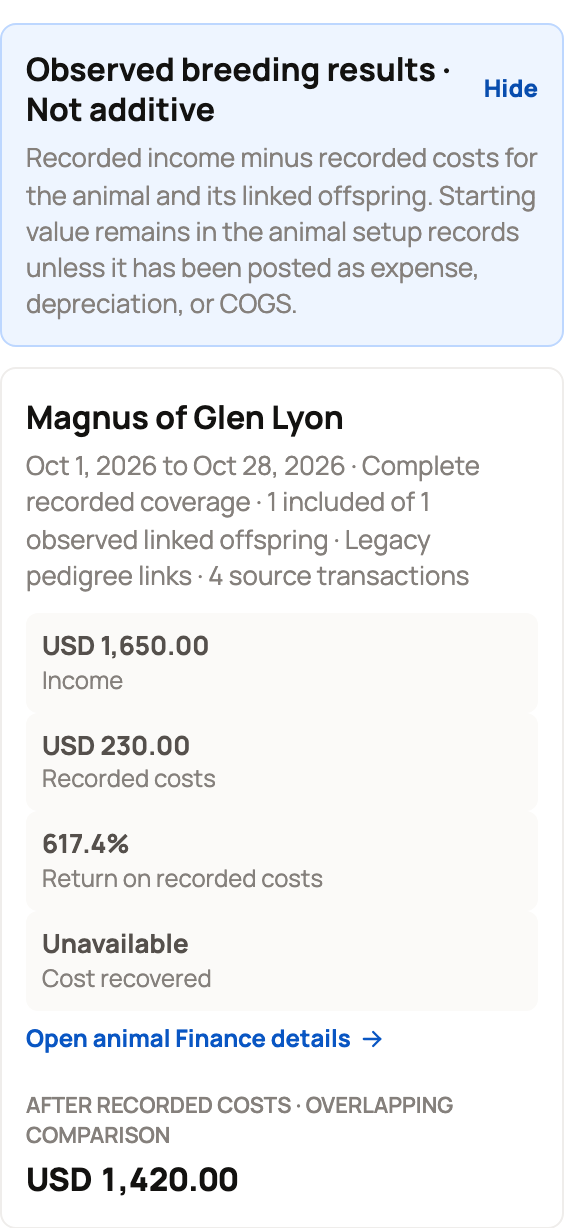
For a breeding animal with linked offspring, a Breeding profitability panel compares what the animal and its offspring earned against what they cost. It is a management view built from the pedigree links and your posted entries, and it shows:


  • Linked offspring and Source transactions: how many offspring and how many entries feed the calculation.
  • Parent revenue and Offspring revenue: income attributed to the parent and to its offspring.
  • Parent direct costs and Offspring direct costs: expenses connected to each.
  • Net from breeding: parent plus offspring revenue, minus parent plus offspring direct costs. Starting value is excluded unless it has been posted as an expense, depreciation, or cost of goods sold, so this is a cash-in-versus-cash-out view of the breeding line.
  • Return on direct costs: net from breeding as a percentage of those direct costs.
  • Purchase price and Cost recovered: the parent's cost basis, and how much of it the breeding has recovered. If no purchase price is recorded, this reads "No purchase price recorded."


A per-offspring table lists each offspring with its revenue, costs, and net, so you can see which offspring drove the result. Offspring revenue is attributed through the pedigree, which means linking parents to offspring and connecting their income and costs is what powers this panel; if there is not enough data yet, the panel says so.


Genetic line profitability


When an animal has descendants across several generations, a Genetic line profitability panel widens the view to the whole line: total descendants, generations, descendant gross sales and direct costs, the net line margin, how many line sales went through the marketplace, and your line compared against the breed median sale price from the marketplace. It answers "is this bloodline earning above or below the market," and where there is not enough marketplace data, it says so rather than guessing.


Keeping it accurate


The more you connect income and expenses to specific animals when you record them, the more useful these per-animal numbers, and your overall Estimated value, become.


Updated on: 07/07/2026

Was this article helpful?

Share your feedback

Cancel

Thank you!