Articles on: Finance & Accounting

Understanding your finance dashboard

Understanding your finance dashboard


Creatures Finance keeps simple books for your animal operation: what you have invested in your animals, what has come in, what has gone out, and which animals the money connects to. The dashboard is the plain-language view. Behind it, Creatures keeps proper double-entry books, so your totals stay consistent and your records are ready when it is time to review with an accountant or file taxes.


Open Finance


From your Dashboard, open Finance (or go to creatures.com/finance). This opens the simple view at /finance. Two buttons sit at the top:


  • Add money jumps to the entry form lower on the page (covered in Recording money in and out).
  • Advanced records opens the full bookkeeping view at /finance/ledger, where the chart of accounts, the profit-and-loss report, and the balance sheet live. You do not need it for day-to-day tracking, but it is there when you or your accountant want the detail.


Your finance dashboard


Invoice a buyer


Near the top of the page, an Invoices panel is your entry point for billing a buyer directly, reading "Invoice a buyer and collect payment by direct bank transfer." Select View invoices to open your private sale invoices at /finance/invoices, where you create an invoice, put one or more animals on it, send it, and collect payment by bank transfer or Creatures wallet. When the buyer pays, the income posts to these books and, for an animal sale, ownership transfers automatically, so a direct sale stays in your records without any double entry. For the full walkthrough, see Send and get paid on a private invoice.


The Invoices panel on your finance dashboard


The estimated value panel


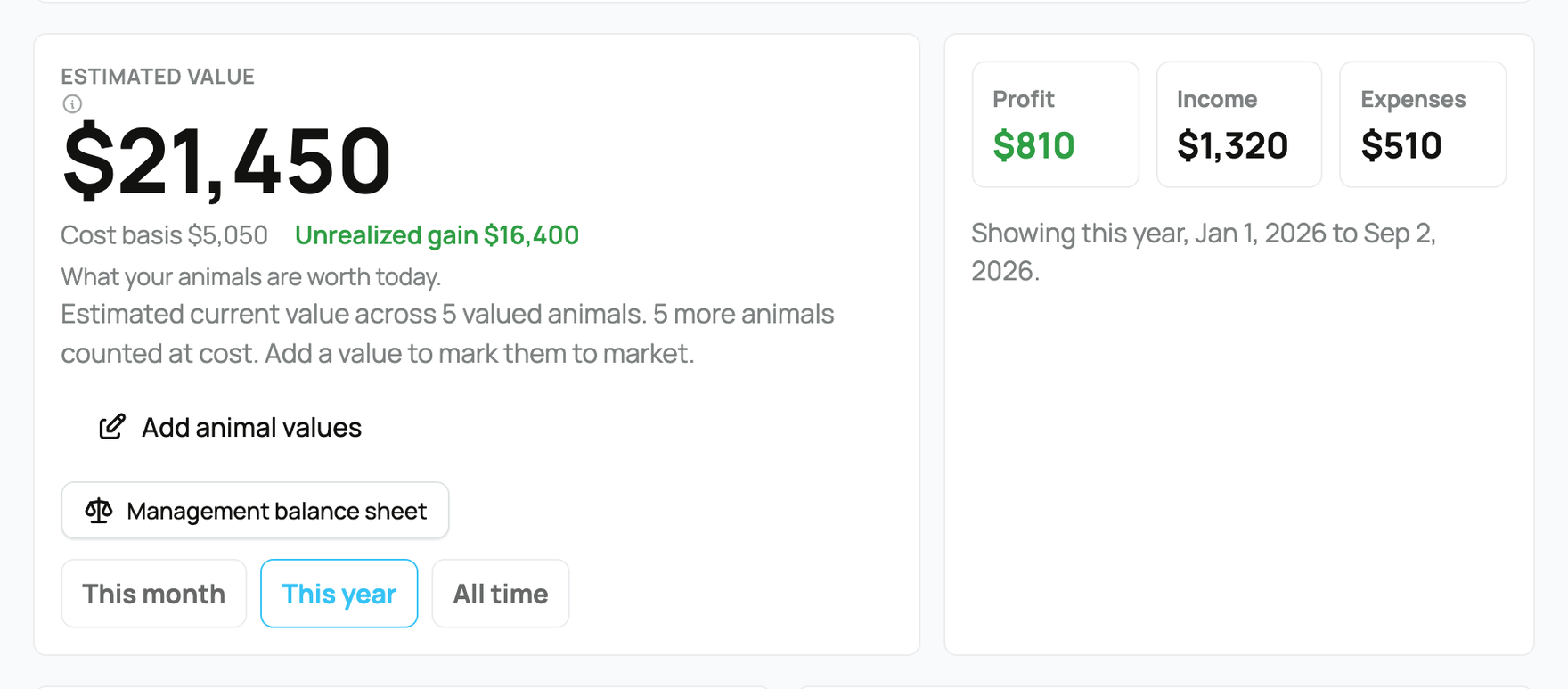
The large number on the left is your Estimated value: what your animals are worth today, totaled across the animals you own. It is a mark-to-market figure for planning and decisions, not income, and it does not change your books, your taxes, or your accounting records.


  • How it is built: for each animal that has a value you set or a Crestimate, that current value is used. For an animal you have not valued yet, Creatures falls back to what you paid (its cost basis), so every owned animal still counts. The note under the number reads "What your animals are worth today."
  • Cost basis: a second line shows your total Cost basis, the sum of what you paid or recorded as a starting value across those same animals. This is the "what I have into them" figure.
  • Unrealized gain or loss: the next line is the difference between the two, labeled Unrealized gain when your estimated value is higher than your cost basis and Unrealized loss when it is lower. It turns green for a gain and red for a loss. "Unrealized" means on paper only: nothing is counted as profit until you actually sell.
  • The caption: a line tells you how many of your animals carry a real value, for example "Estimated current value across 6 valued animals." If some are still counted at cost, it adds "2 more animals counted at cost. Add a value to mark them to market."
  • The buttons: Review current values opens the inventory valuation page where you set, refresh, and compare values per animal. (When you own animals that have no value yet, this button reads Add animal values instead, pointing at the same page so you can fill the gaps.) Management balance sheet opens a by-category view of book value versus management value. Both are planning views and neither changes your accounting records.
  • Why it matters: the more animals you give a real value, the closer this number gets to what your herd is actually worth today rather than what you paid. Recording cost basis is also what later lets Creatures calculate accurate profit and tax gain or loss when you sell. See Animal cost basis and starting values. For a market-value second opinion on any one animal, see What is a Crestimate?.


The time period filter


Under the value panel are three period tabs. They control the date range for the Profit, Income, and Expenses tiles and for the category breakdowns below.


  • This month: the first day of the current month through today.
  • This year: January 1 of the current year through today.
  • All time: your earliest recorded activity through today.


Choosing a period does not change your data, only the window you are looking through. Your Estimated value is a snapshot of worth today and does not change with the period.


Profit, income, and expenses


Three tiles summarize the selected period:


  • Income: total money in for the period.
  • Expenses: total money out for the period.
  • Profit: income minus expenses. It turns red when negative and green when positive, so a loss is obvious at a glance. The caption reads "Income minus expenses for this date range," a reminder that profit here does not subtract your animal cost basis. Cost basis affects gain or loss when an animal is sold, not your period profit.


Income and expenses by category


Below the tiles, two panels break the period down by category, largest first:


  • Income lists categories such as Animal sale, Stud/breeding service, Other service, and Other income.
  • Expenses lists categories such as Feed, Vet/health, Supplies, Breeding fees paid, and Other.


Each category maps to the correct accounting and tax line for you, so the simple label you pick when you record an entry still lands in the right place in your books. If a panel is empty, you will see "No income yet" or "No expenses yet" for that period.


Recent activity


The Recent activity list shows your latest saved entries and Creatures activity, newest first, with the date and amount. This includes entries you typed in and entries Creatures posted for you, such as a completed marketplace sale. It is the quick audit trail for "what changed recently."


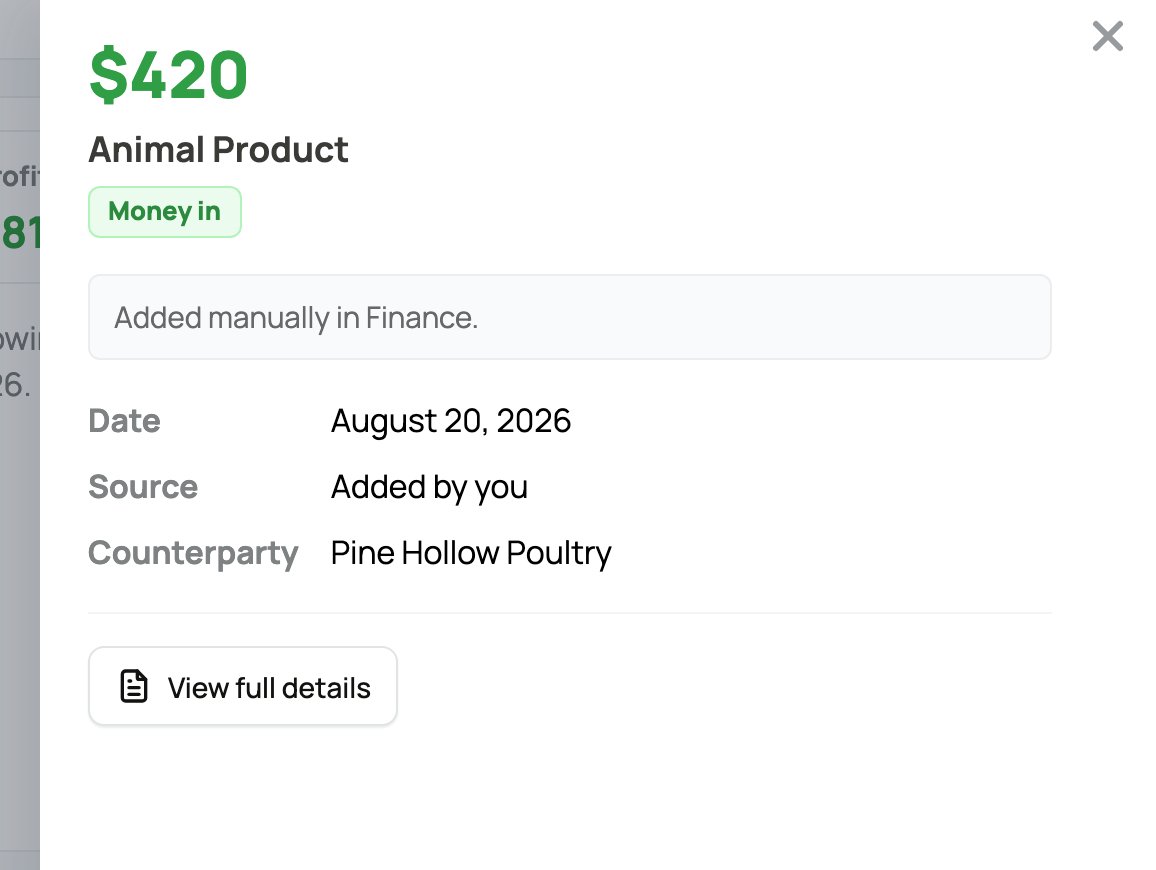
Each row is selectable. Select any entry to slide open a detail panel for it without leaving the dashboard, showing the amount, the full description, the date, and the category, with a View full details link through to the complete transaction. It is the fastest way to check what a line was for.


Opening an activity entry's detail panel


The per-animal table


The Animals panel connects your numbers to individual animals. Each row links to that animal's full Finance tab. A small Value / Profit toggle at the top of the panel switches what the rows show, so you can look at worth and at earnings without leaving the page.


  • Value: the worth view. Each row shows that animal's Cost basis (what you paid or recorded), its Est. value (what it is worth today), and an Unrealized gain or loss when the two differ, shown green for a gain and red for a loss. The amount on the right is the estimated value. This view does not depend on the time period; it is a snapshot of worth.
  • Profit: the earnings view. Each row shows the Income and Expenses linked to that animal for the selected period, with Profit (income minus expenses) on the right, green when positive and red when negative.
  • What it means: the Profit view only includes entries you connected to an animal, so this table rewards connecting income and expenses to specific animals as you record them. An entry with no animal attached still counts in your overall totals; it just will not appear in any animal's row. Money you allocated to an animal group counts toward your totals too, but is not broken out per animal here, so a short note says so when it applies.
  • The implication: use Value to see which animals are worth the most and where your unrealized gains sit, and Profit to see which animals are earning their keep this period. For the full per-animal picture, including breeding return, see An animal's finances and ROI.


If a marketplace sale is waiting


If you have completed marketplace sales that are not yet in your money tracking, a Marketplace sales are ready for Finance notice appears with an Open Finance button. It lists each set of waiting sales with a count and the latest animal, and Creatures keeps showing it until those sales are posted to a book, so your numbers are not silently missing real income.


Updated on: 07/07/2026

Was this article helpful?

Share your feedback

Cancel

Thank you!