
Measuring day: weigh and measure your herd in one sitting
Measuring day records weights and other measurements for many animals in one sitting. Pick the animals, fill in what you measured on each row, and each value saves to that animal's records. Cells you leave empty save nothing.
Open Measuring day
- On your Animals tab, or your farm's, choose Measuring day. It shows once you have three or more animals you can add records for.
- On a group's page, choose Measuring day to start with that group's animals.
- After a FAMACHA round, choose Measure them too? on the summary. See Run a FAMACHA eye-score round.
- Weighing animals one by one in the record form? After the third, it offers Measuring several animals? Open measuring day, with those animals carried over.
Choose the animals, the day and the measurements
- Check the Sitting date. It starts on today, and you can pick an earlier day. Each row also has its own Date for an animal you measured on another day.
- From your Animals tab, every animal starts picked. Tap a chip to narrow it to a set, such as All goats (6), Does (4), a place, a group or Measured last time (3). Or pick names under Pick animals by name · up to 200.
- Open Metrics and units to add or remove a measurement and choose its unit. It starts with what you measured last time. With no history yet, it starts with weight, plus heart girth for species with a weight calculator.
Each cell shows the animal's last value and its date as a hint.
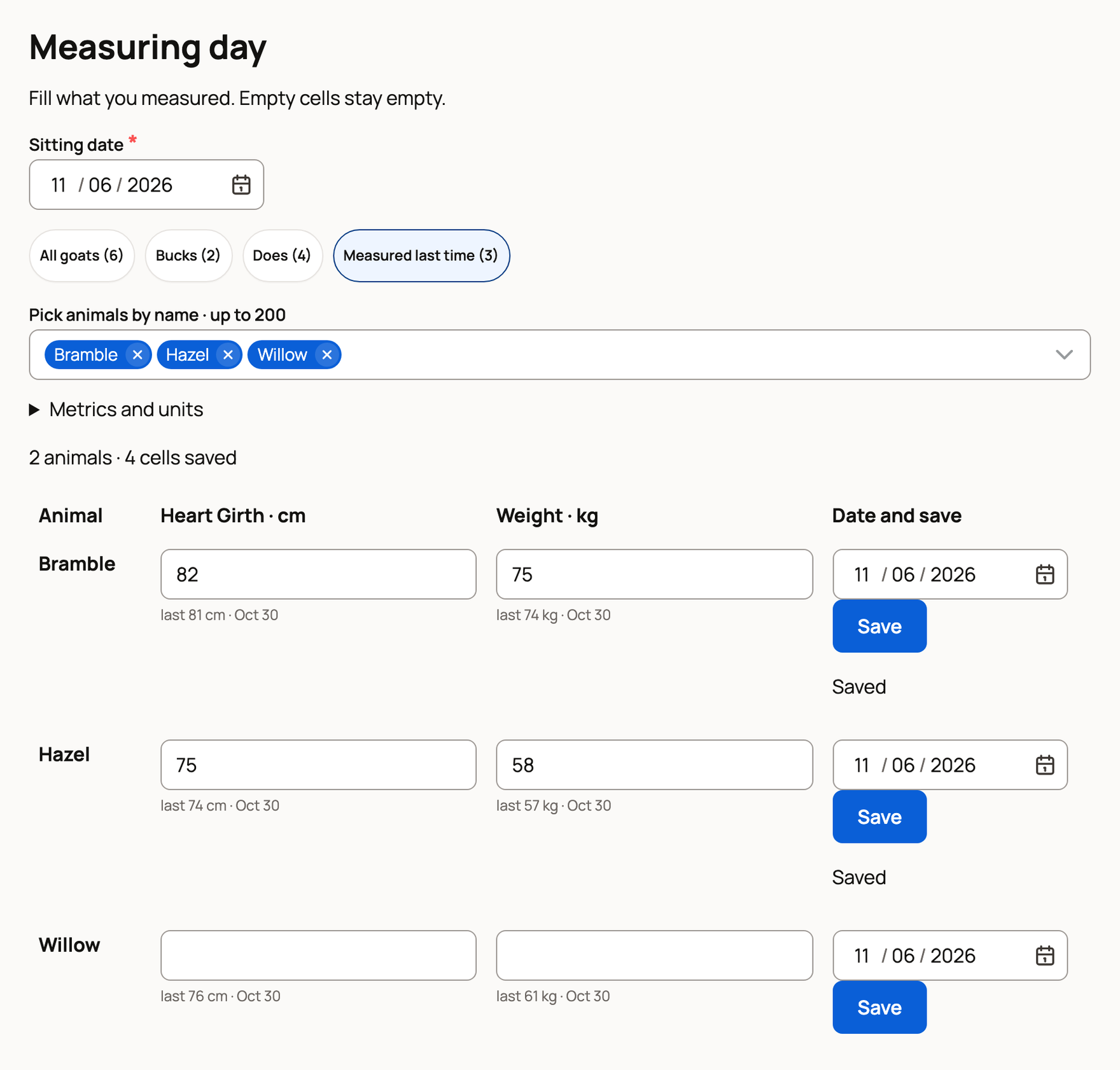
Fill in and save
On a phone you see one animal at a time. Type its values and choose Next animal ›, which saves that row and moves on. On a computer the animals are rows in a table. Select Save at the end of each row. A row says Saved once Creatures has it.
- Leave a cell empty for anything you didn't measure. Nothing is saved for it, and the animal isn't marked as skipped.
- Use estimate: for a species with a weight calculator, add Body Length under Metrics and units if it isn't a column yet. Fill in heart girth and body length, leave weight empty, and the weight cell offers Use estimate with the tape estimate. Tap it to fill in the weight, which is saved as an estimated weight.
- A value that looks like the wrong unit gets a note with a button to switch the unit and one to keep it. It never stops the save.
- No signal? Rows wait on your phone and say On this phone · will retry. Keep the page open and choose Retry unsaved if it shows.
When you're done, choose Finish measuring. Creatures tells you how many animals and cells were saved.
Wrote the numbers on a sheet instead? Choose Measured on paper? Import a photo of the sheet.
Where the values go
Each value is a measurement record on the animal's Records tab, and it adds to the trend in its Measurements view. A measuring day doesn't post to the community feed. Each record follows your usual privacy setting for measurements. To fix a value later, edit that record on the animal's Records tab.
Related information
Updated on: 06/11/2026
Thank you!