
Reference animals: documenting lineage and inviting the owner
Create a reference animal when you need a sire, dam, or other relative in a pedigree but do not own that animal. The profile can later be claimed by its real owner.
Create the reference
- Select Add animal, then Enter details manually.
- Under your relationship to the animal, choose I'm adding this only for pedigree/lineage reference.
- Add the name, species, breed, sex, and any dates you know. A photo is optional.
- Use More profile details for family relationships and other known information.
- Select Create animal profile.

The result is public and carries a reference label. Keep the information limited to what you can support; other pedigrees may use it. Search for an existing profile before adding the same ancestor again.
Invite the owner
If you created the reference, find Invite the owner beside its Added by information.
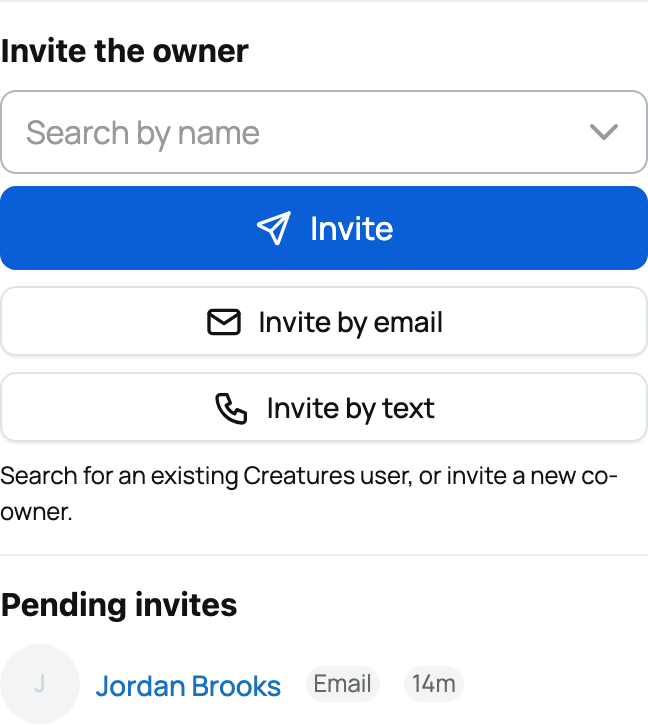
- Search by name and select Invite for an existing member.
- Choose Invite by email, enter the address, and select Send invite.
- Choose Invite by text when available, confirm consent, and select Send invite.
You can also share the profile's claim link yourself. Sharing a general link is not the same as inviting a specific recipient, so it does not promise immediate approval.
What happens when it is claimed
An invited recipient can claim immediately after confirming the intended account. If you created the reference and now own the animal, your own claim can also be approved immediately. Other claims need Creatures review.
After approval, the owner takes over the profile and its existing information. You no longer maintain it just because you created the reference.
Use a reference only for an animal you do not own. If you currently own the animal and are handing it to someone else, use an ownership transfer instead.
Related information
- Claiming a reference animal someone created for you
- Public, private, and reference animals
- Pedigree, family, and lineage
Updated on: 03/09/2026
Thank you!