Shipping and tracking genetic items
After a marketplace sale, Creatures tracks fulfillment from shipment to delivery, so both the seller and the buyer always know where the material is, and so payment releases at the right time.
Seller: record the shipment
When an item sells, you will find the order on your Sales page (and on the listing). Record how it is reaching the buyer.

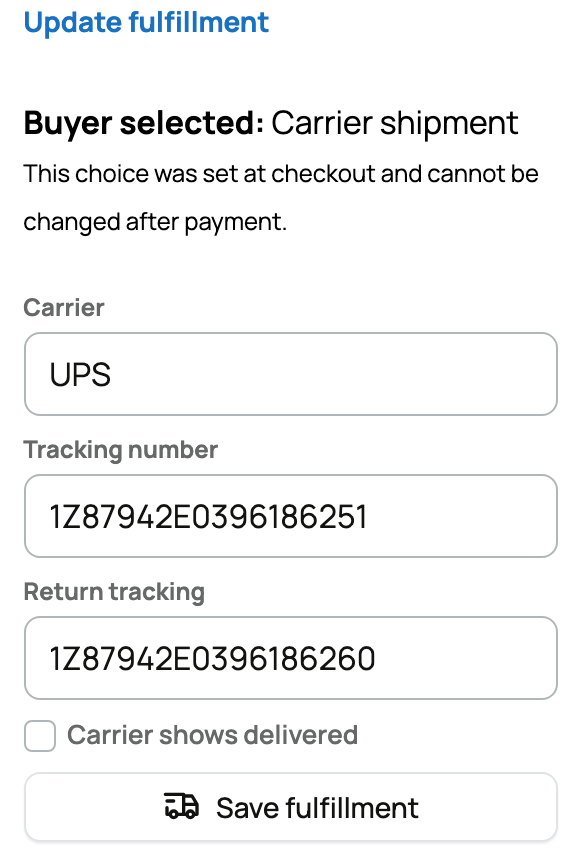
- Fulfillment method: how the material gets there. The choices are Carrier shipment, Courier, Pickup, Storage transfer (handed to a storage provider), and Seller delivery. Carrier and Courier are the tracked methods; the others are confirmed by hand. Your pick decides which fields and confirmations you see next.
- For a tracked method, enter the carrier and tracking number and mark it shipped. The buyer is notified with the tracking details, and a recognized carrier becomes a clickable tracking link. You can also mark when the carrier shows the package delivered. If the material is bulky enough to need a hauler rather than a parcel carrier, you can arrange one through Creatures; see Requesting transport for an animal.
- For a pickup, handoff, or transfer, there is nothing to track, so you simply confirm the handoff when it is done.
Marking a shipment delivered, or confirming a handoff, starts a 7-day window: if the buyer does not confirm receipt or report a problem in that time, the sale releases to you automatically, so a quiet buyer cannot tie up your payout indefinitely.
For an off-platform sale you recorded by hand, you can still track shipments if you flagged the sale to be held for the buyer. You log the carrier and tracking number and a ship date, and you can record partial shipments (several boxes on different dates) until the whole quantity has gone out. Each shipment can be undone if you logged it by mistake.
Buyer: follow and confirm
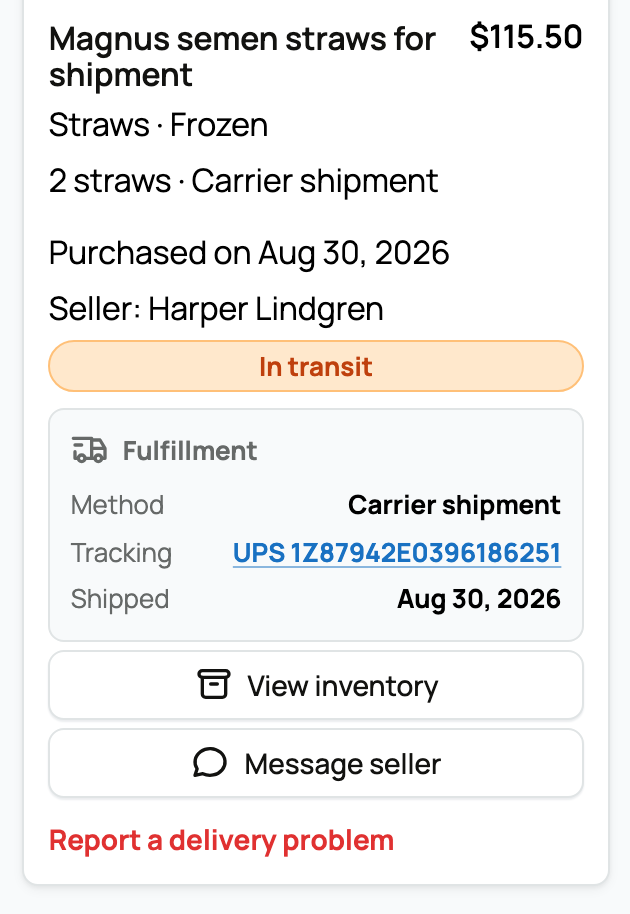
As the buyer, your order appears under My purchases, where you can follow the status and tracking.

- The fulfillment summary shows the method, the tracking link (once the seller adds it), and the dates it was shipped and delivered.
- When the material arrives, choose Confirm receipt to complete the order and release payment to the seller. This is the moment that pays the seller, so only confirm once you have the material and it is right.
- If you do not confirm, Creatures auto-confirms after the 7-day window so the seller is not left waiting.
- If something is wrong, report a delivery problem instead, with a description (and photos where they help). That holds the seller's payout, and Creatures support helps resolve it before any money is released. You cannot report a problem after the sale has already released, so raise it before you confirm.
Transferring stored material instead of shipping
Some genetic material is sold while it is sitting in cryo storage (a liquid nitrogen tank), not boxed up for shipping. For those sales you can move the custody of the stored item from your storage to the buyer's storage without the material ever leaving a facility. On the order's fulfillment method, this is Storage transfer.

Choose Storage transfer as the Fulfillment method when the buyer is going to keep the material in storage rather than receive a shipment. Picking it replaces the carrier and tracking fields with a storage handoff, because nothing physically ships. Once you choose it, you declare a Storage context, which tells Creatures whether the handoff happens inside storage it can track or somewhere it cannot:
- Managed storage: the material moves to a Creatures-tracked storage provider, so Creatures follows it from your tank to the buyer's account and the provider confirms receipt. Choose this when both the source and the destination are storage that Creatures knows about. This is the path that gives the buyer a destination panel and the provider a receipt step.
- External facility: the material is handed off at a facility Creatures does not manage. Choose this when the storage is off-platform. It asks only for a facility name (so the record names where the material went) and a logged confirmation (you tick that the handoff actually happened). Because Creatures cannot see inside an external facility, there is no provider receipt and no buyer destination step, and the transfer is final once you log it.
Managed storage: source and destination
When you pick Managed storage, you fill in where the material is coming from and where it is going. Each field points at a specific piece of your storage so the right units leave the right place:
- Source subscription: which of your own storage subscriptions currently holds the material. This is the account you are paying a provider to store it in. Picking it scopes the next fields to that subscription's inventory and facility, so you are always moving real, stored units.
- Source inventory: the exact stored item being transferred. Its material type has to match the sale (you cannot ship straws against an embryo sale), so the list only offers items that fit. This is what guarantees the buyer receives the same kind of material they bought.
- Source facility location: the node inside that provider (a tank, canister, or cane) the units leave from. It tells the provider exactly where to pull the material, so the right physical spot is drawn down.
- Destination service: an active storage service to send the material to. This is the storage offering on the receiving side. Setting it points the transfer at a real destination the buyer can keep using.
- Destination provider: the provider receiving the material, used when you are routing by provider rather than a specific service. You set the destination service, the destination provider, or both, depending on how the receiving side is organized.
After you declare the context, the rest of the handoff is the buyer's and the provider's to finish: the buyer chooses where to keep the material stored and approves any change to their storage bill, and the storage provider records receipt (or rejects it back to the buyer). Those two steps, plus every storage-transfer status you will see along the way, are covered from the buyer and provider side in Subscribing to genetic storage.
Refunding a sale (seller)
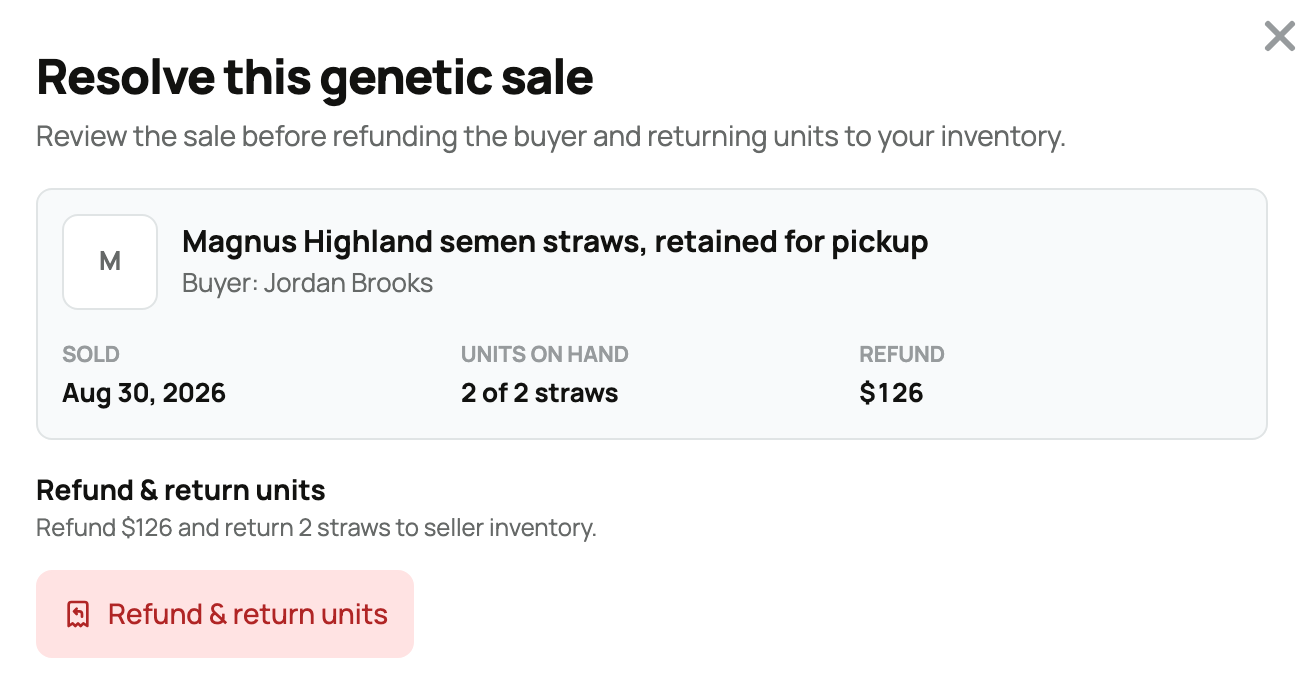
If a marketplace genetics sale should not stand, you can refund it. A refund is a return, not just a price adjustment: the buyer's units come back to your inventory and the buyer is paid back the matching amount. This is the genetics version of undoing a sale, and where it sits in fulfillment decides whether you can do it yourself.

- Before the material leaves you: while the order is still on hand and nothing has shipped, been picked up, or been handed off, you can refund it yourself from the order on your Sales page. You confirm a single action, Refund and return units, which both refunds the buyer and brings the units back. There is no partial-quantity option here; it returns the units the buyer still holds, in full, for the pro-rated amount they paid.
- After it has shipped or handed off: once you mark a shipment, confirm a handoff, log a storage transfer, or the sale otherwise completes, you can no longer refund on your own. Message Creatures support and they run it for you, so the unit return and the money stay in sync. The same is true if the sale is already in a dispute (a buyer reported a problem): refund actions pause until that is resolved.
- What it returns to your inventory: the buyer-held units go back to the source item and become Available again, your listing's sold and remaining counts are reversed so the returned units can be relisted, and the movement is logged in the item's history. If the sale included a recipient animal, that animal returns to you too (as long as the buyer still owns it).
- What the buyer is paid: the actual amount they paid for the returned units, the 5% buyer service fee on those units included. Your net for that sale is reversed by the matching amount, so a full return leaves you where you were before the sale. A sale that brought in nothing (a full-promo order) has nothing to refund.
- The status you will see: the sale shows Genetics refund started while Stripe works, then Genetics refund complete once the units are back and the money is on its way. It shows Genetics refund needs review if Creatures needs to check it by hand before custody or money moves, or Genetics refund needs help if Stripe could not complete the refund automatically. The buyer is notified, and so are you.
- What it means for you: handling a bad sale this way keeps your counts, history, and payouts honest with no stranded units or money, which is exactly the record buyers see when they weigh your listings. Doing it before the material ships keeps it self-serve; after that, a quick note to support is the safe path.
Related information
- Recording genetic sales and use
- Buying genetics on the marketplace
- Listing genetics on the marketplace
Updated on: 23/06/2026
Thank you!