Using your cart: buy multiple animals or genetics in one checkout
When you are buying more than one thing at once, your cart lets you gather it all and pay in a single checkout, even when the items come from different sellers. Instead of paying separately for each animal, you add everything to your cart and pay once. This guide covers adding items, everything on the cart page, and how one payment covers the whole order.

The cart icon in the header
When you are signed in, a cart icon sits in the top navigation with a small count badge showing how many items are waiting in your cart. The badge appears as soon as you add something and updates as you add or remove items (it shows nothing when the cart is empty, and 99+ if you somehow get that far). Select the icon any time to open your cart.
Adding a fixed-price animal to your cart
On a fixed-price animal listing, an Add to cart button sits right next to Buy Now.
- Buy Now takes that one animal straight to checkout.
- Add to cart puts it in your cart so you can keep shopping and pay for it together with other items later.
Select Add to cart and the button changes to Added to cart with a View cart link, and the header count goes up by one. Add to cart shows on active fixed-price listings you can buy; it does not appear on auctions (you bid on those), on your own listings, or on a listing where you already have an accepted offer (there you get a single checkout button for that offer). Your cart can also hold genetics you are buying; genetics appear in their own section of the cart, described below.
The cart page
Opening your cart shows everything you are about to buy, grouped so it is easy to read.

If your cart is empty, you will see "Your cart is empty" and a Browse marketplace button to go find animals. Once you have items, they are grouped two ways:
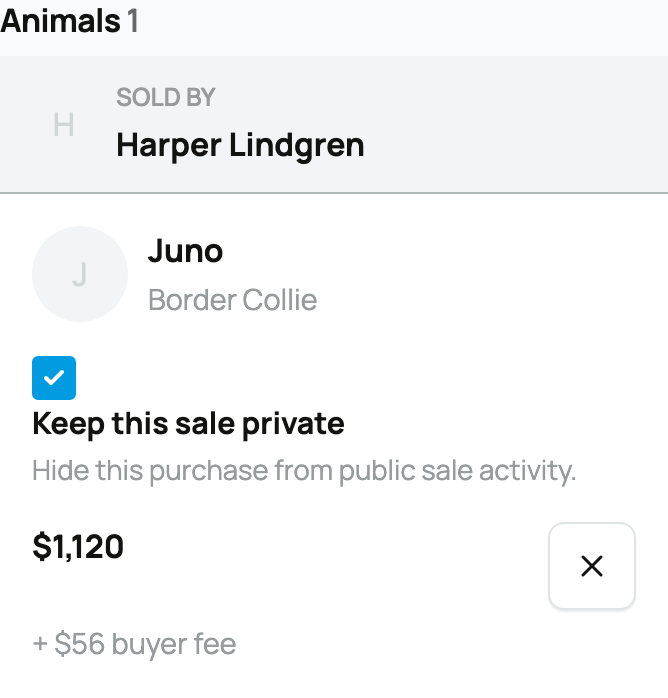
- By kind: an Animals section and a Genetics section, each with a count, so the two types of purchase stay clearly separated.
- By seller within each section: every seller gets their own "Sold by" panel. If you are buying two animals from two different breeders, you will see both sellers listed, and you still check out only once.
Each item shows its photo, name, and price, with the buyer fee listed just beneath it so you always see what a line actually costs.
Per-item controls
Every line in the cart carries a few controls:
- Keep this sale private: a checkbox on each item, labeled "Keep this sale private" with the note "Hide this purchase from public sale activity." Tick it and that particular purchase is kept private (no public sale post), the same privacy choice covered in Keeping your purchase private, decided per item.
- Quantity (genetics only): a genetics line has a quantity stepper (a minus button, the number, and a plus button) because you can buy several units, for example a number of semen straws. The small line beneath it reads like "3 × $75.00" so you can see the unit price and the count. Animals do not have a quantity; each is a single animal.
- Remove: the x button takes that item out of your cart.
The order summary
Down the side, the Order summary totals everything and is where you check out. From top to bottom:
- A subtitle like "3 items from 2 sellers", so you know exactly what the order covers.
- A line for each item with its price (including its buyer fee).
- A promo code box for each animal seller: enter a code and select Apply, and it applies to that seller's items. Codes are per seller, so a code from one breeder does not touch another seller's items.
- A Volume discount line, if a seller offers one and you qualify by buying more than one animal from them (see the buyer volume discount in Buying at a fixed price). The summary even nudges you when adding one more from a seller would unlock a saving. Sellers set these up as volume discounts.
- Creatures Credit and Wallet balance lines, if you have either. Creatures applies your Credit first, then your Wallet, automatically, before charging any card. The note in the summary says it plainly: "Available Credit and wallet funds are applied automatically before card payment."
- Due today, the amount you actually pay now after Credit and Wallet are applied. If your stored value covers the whole order, this is $0.
Beneath that, a small breakdown shows the Item subtotal and Buyer service fees, and a reassuring line: "Pay once for every seller."
Checkout: one payment for the whole cart
Select the checkout button (Continue to secure checkout when there is a card amount to pay, or Complete purchase when Credit and Wallet already cover it) and you pay for the entire cart in one transaction, no matter how many sellers are involved. Behind the scenes Creatures splits the money to each seller for you; you only pay once. You can pay by card, US bank account (ACH), or Cash App Pay, with your Credit and Wallet already applied first.
The protection is exactly the same as any single purchase: your payment is held by Creatures for each item and released to each seller only when you confirm that item arrived. See How buying works for the full held-funds flow and Paying with Wallet, Credit, and ACH for how stored value stacks.
Where your items go after you pay

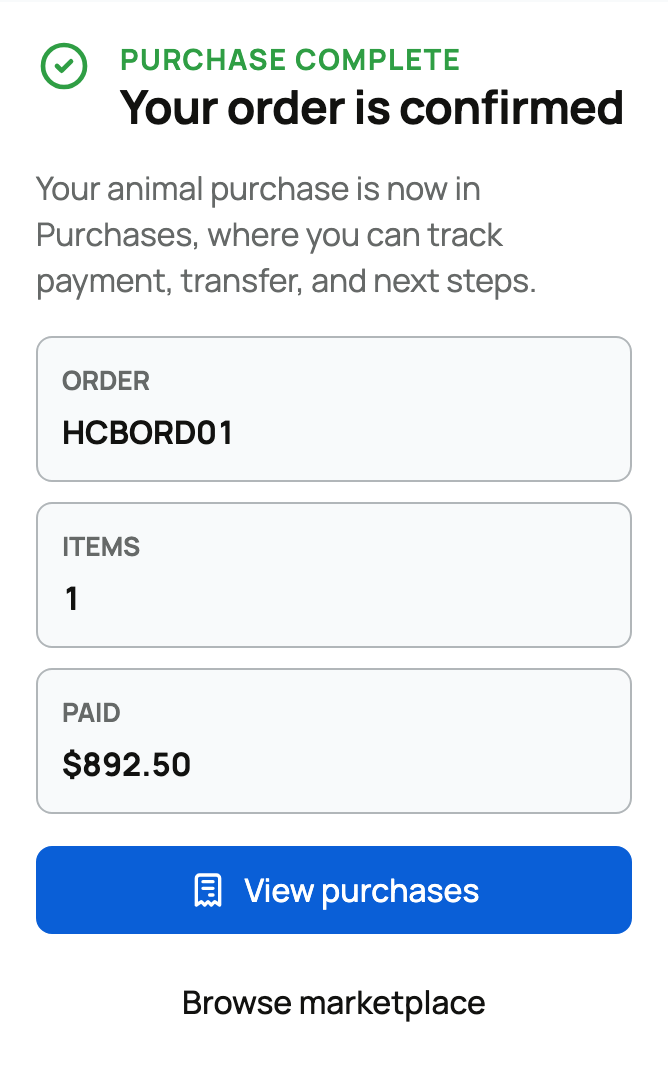
Once payment goes through, you land on a confirmation that your order is confirmed, and every item moves into your Purchases at Purchases in your dashboard. That is where you track each one from here: delivery, transfer, confirming receipt, and next steps. Genetics stay in pending custody there until you confirm you received them. If you leave checkout without paying, your cart is kept exactly as it was, ready for when you come back.
Related information
- How buying works: payments, held funds, and protection
- Paying with Wallet, Credit, and ACH
- Buying at a fixed price
Updated on: 07/07/2026
Thank you!