
Why is my Wallet balance negative?
A Wallet goes below zero when money already paid into it has to go back, such as a deposit or sale refunded to a buyer. Your next earnings in that Wallet pay it off first, or you can pay it now by card with Settle now.
Until the Wallet is back above zero, it can't pay out to your bank.
Read the note
Open your Dashboard, then Money. A note at the top of the Wallet card names the Wallet, the amount owed and the reason.
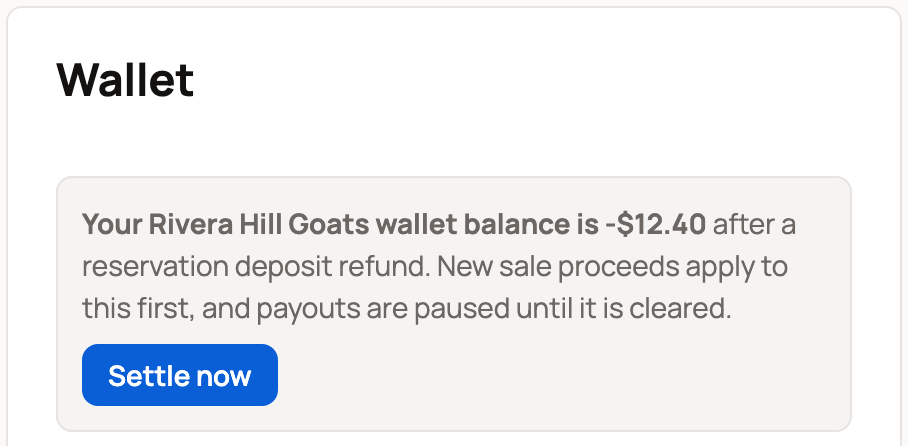
The reason is one of these:
- after a reservation deposit refund
- after a refund on (the animal's name)
- after an organization charge refund
- after an invoice refund or payment dispute
- after a refund or payment dispute
Each Wallet below zero gets its own note. That can be your personal Wallet or an organization you own or co-own. Your other Wallets aren't affected.
Find what caused it
Scroll down to Wallet activity. Look for the row that took the money, such as Reservation deposit refunded to buyer, Sale refunded to buyer or Held for a payment dispute. If you have more than one Wallet, the Wallet label on the row shows which one.
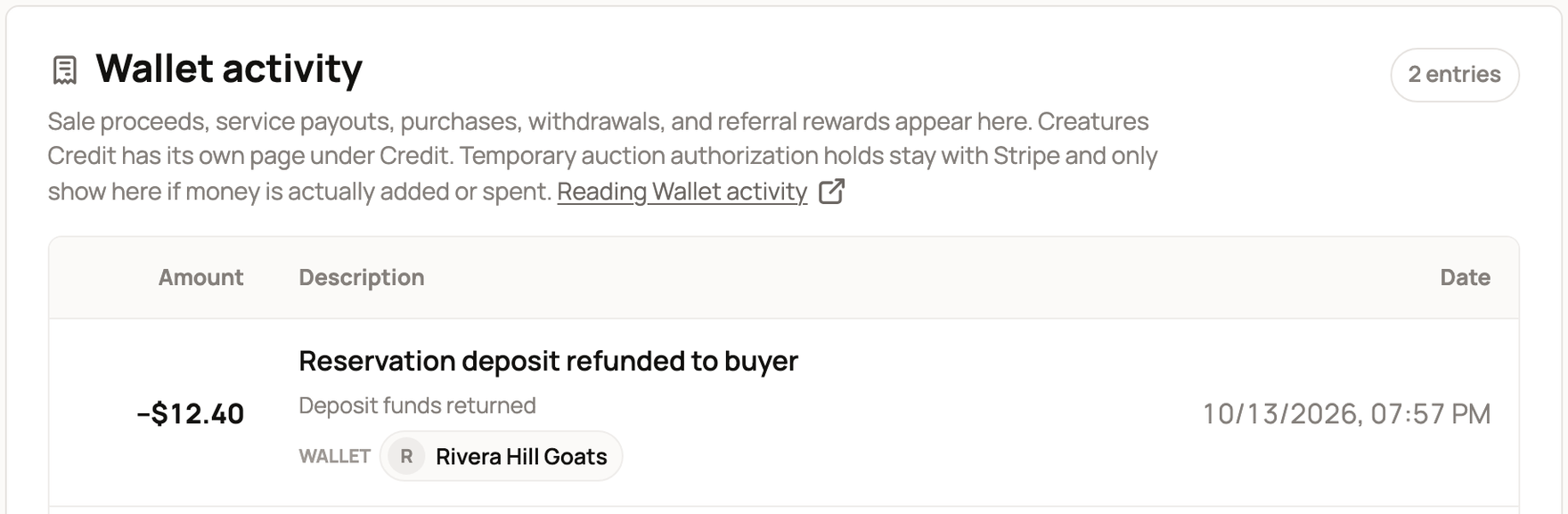
For more on each row, read Understand your Wallet activity.
Let new earnings clear it
You don't have to do anything. The next sale proceeds or payouts into that Wallet go to the amount owed first. Once the Wallet is above zero, you can withdraw again.
Stud services are different. While a Wallet is below zero, stud customers can't pay you online, and stud payouts wait. Use Settle now to clear it first.
If you owe less than $0.50, there's no button. The note says your next sale proceeds will clear it automatically.
Pay it now with Settle now
- In the note, select Settle now. It shows when you owe $0.50 or more.
- On Stripe's secure card page, pay the exact amount. It's listed as "Creatures balance settlement."
- Stripe sends you back to your Wallet.
You pay with your own card, even for an organization's Wallet. Creatures covers the card fee, so the whole amount goes to the Wallet.
What happens next
After you pay, the page says "Payment received." Your balance updates as soon as Stripe confirms the payment, usually within a minute.

- The note goes away, and a Negative balance paid by card row appears in Wallet activity.
- If you leave the card page without paying, the page says "Payment canceled. Nothing was charged, and the amount owed is unchanged."
- If the card page couldn't open, the page says "We couldn't start the card payment. Nothing was charged." Try again.
If something looks wrong
- The amount owed still shows after you paid. Wait a minute, then refresh the page. Don't pay twice.
- You don't recognize the refund. Open the matching row in Wallet activity to see the sale or deposit. To learn how sale money is released and held, read How seller payout works.
- Still stuck? Contact support with the Wallet name, the amount and the date.
Related information
- Your Creatures Wallet: balance, holds, and getting paid
- Understand your Wallet activity
- Withdrawing your money to your bank
Updated on: 29/10/2026
Thank you!