Articles on: Your Animals & Records

How to generate a Crestimate

How to generate a Crestimate


A Crestimate is generated per animal, by you or anyone who helps manage that animal. This guide covers what an animal needs before it qualifies, how to generate and refresh the estimate, the short wait while it runs, the optional fields that make it more confident, and the daily limits.


What an animal needs first (the eligibility gate)


Before Creatures can estimate a value, the animal's profile needs exactly four facts:


  • Species: the kind of animal.
  • Breed: the breed within that species.
  • Sex: male or female.
  • Age: either an entered age or a date of birth. Either one satisfies this requirement.


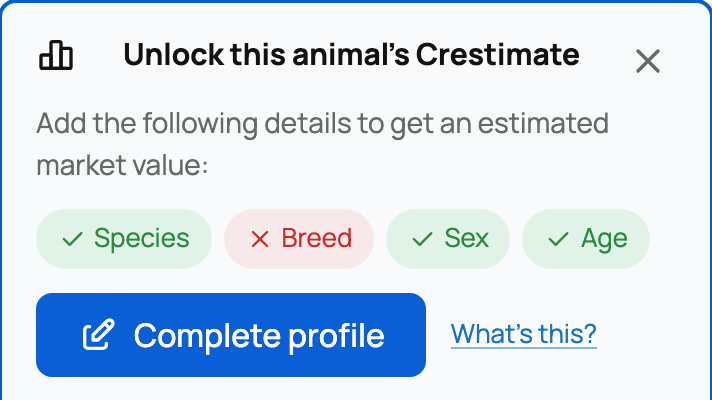
These four are required because they are the minimum the comparable-sales lookup needs to find animals worth comparing against. What this means for you: until all four are set, the animal is not yet eligible. The profile shows an "Unlock this animal's Crestimate" checklist that marks which facts are present and which are missing, with a link beside each missing one that takes you straight to the right spot in the edit form. While the animal is ineligible, the profile control reads "Unlock Crestimate" instead of "Crestimate". The animal's edit form also shows a small readiness widget with a progress bar counting how many of the four required fields you have filled.


The eligibility checklist on an animal that is not yet ready


Generating it, and where the control lives


Open the Crestimate panel on the animal's profile. At desktop width the control sits inside the More actions menu (the ... button on the profile), so look there if you do not see it as a top-level button.


  • When the animal is eligible but has no estimate yet, the panel shows a Generate Crestimate button. Select it to start.
  • When an estimate already exists, the same button reads Refresh, which produces a fresh estimate using the latest profile and market data.


Who can generate or refresh: the people who help manage the animal, that is the owner, a co-owner, a team member, or a seller acting as custodian. A plain viewer or follower does not see the control at all. What this means for you: your collaborators on an animal can run a Crestimate; strangers and followers cannot.


The short wait while it runs


A Crestimate is not instant. When you start one, it runs in the background and the panel shows a progress state with three steps, Gathering market data, Consulting valuation models, and Finalizing estimate, along with the note:


Usually ready in about 60 seconds.


A Crestimate being generated


While it runs, the panel tells you so directly:


You can safely leave this page. We'll notify you when your estimate is ready.


What this means for you: you do not have to sit and wait on the panel. You can leave the page, switch tabs, or close it, and Creatures will let you know the moment the estimate is done (see the next section). When you come back, the panel picks the finished estimate back up on its own. If a run fails, you get a button to try again. One small variation: if you start the estimate from a listing's edit form, where you may have unsaved changes, the note instead reassures you that the estimate keeps running in the background while you finish your edits, so you are never nudged off a half-filled form.


You get notified when it finishes


Because a Crestimate runs in the background, you do not have to keep the page open to find out how it turned out. When the estimate you started finishes, Creatures sends you a notification, and it does the same if the run fails:


  • When it succeeds, you get a notification that the animal's Crestimate is ready, with a link straight back to the panel.
  • When it fails, you get a notification that Creatures could not generate the estimate, so you know to try again rather than waiting on a result that is not coming.


These arrive as in-app notifications, and, unless you turn them off, as an email too. They live under the Crestimate Updates group in your notification settings, so you can keep or silence the emails to taste while the in-app notification always lets you know. What this means for you: start an estimate, go do something else, and let the notification bring you back.


Refreshing, and what it does to a live listing


Refreshing is how you bring an estimate up to date after you have improved a profile or as the market moves. There is one detail worth knowing if the animal has an active listing:


  • A manual refresh, run by someone who can publish on that listing, updates the value shown on the live listing.
  • An automatic or scheduled refresh never moves a live listing's shown value on its own.


What this means for you: scheduled refreshes are safe and will not quietly change a listing's number, while a manual refresh is the deliberate way to push an updated value onto a listing you are running. If you have not created that listing yet, start with listing an animal for auction or a fixed-price sale.


Want a more accurate estimate? Add these


When an animal is eligible, the panel suggests optional fields under "Want a more accurate estimate?" Each one you fill in gives the estimate more to work with and nudges the computed confidence up. The four are:


  • A location (state): lets Creatures find closer, more relevant comparable sales for your area.
  • A pedigree (sire and dam): documented parentage helps the models agree and place the animal more precisely.
  • Color: narrows comparisons to animals that actually match.
  • A profile description: the written context adds detail the estimate can use.


Each suggestion links straight to the right section of the edit form. What this means for you: filling these in is the lever you pull to move a Low or Moderate estimate toward High. Having all of them present helps the confidence; leaving several blank holds it back. (Note: registration records and health records are not confidence boosters here, so do not expect them to raise the number. Only the four fields above do.) For what those confidence ratings mean once you have them, see What is a Crestimate?.


Estimating many animals at once


You do not have to open each animal one at a time. If you keep your books in Creatures, the Inventory valuation page in Finance has an "Estimate current values" action that generates Crestimates for a whole batch of your eligible animals in one go, rather than one profile at a time.


The batch runs in the background, the same way a single estimate does. Each animal's value fills in on the page as its estimate finishes, so you can watch the list populate instead of waiting on any one of them. Creatures runs several of them in parallel and paces the rest behind the scenes, so a large herd works through steadily without you babysitting it. The same eligibility and confidence rules apply to every animal in the batch: an animal still needs its four required facts to qualify, and each result still comes back with its own range and confidence rating.


What this means for you: when you want a value on many animals, start the batch from the Inventory valuation page and let it work, rather than generating each one by hand.


The daily limits


There is a cap on how often you can generate or refresh, and Creatures does not show it to you up front, so it is worth knowing:


  • Up to 3 times per animal per day.
  • Up to 10 times per day across all of your animals.


What counts toward the cap is a genuinely new generation or refresh; re-clicking one that is already running does not count again. What this means for you: if you hit the cap, the next attempt shows the message "You've used your refreshes for today. Please try again tomorrow.", and you simply wait until the next day, when the count resets. There is no counter on the panel, so this article is your heads-up that the budget exists and what it is.


Once you have an estimate, the next step is deciding whether to show it and how to use it for pricing. See Showing a Crestimate and using it for pricing.


Updated on: 25/06/2026

Was this article helpful?

Share your feedback

Cancel

Thank you!