Showing a Crestimate and using it for pricing
A Crestimate is private by default. This guide covers how to share a compact version on the public profile, exactly what a buyer sees when you do, how to use the estimate to price a listing, and how a Crestimate connects to your Finance numbers.
The "Display publicly" toggle
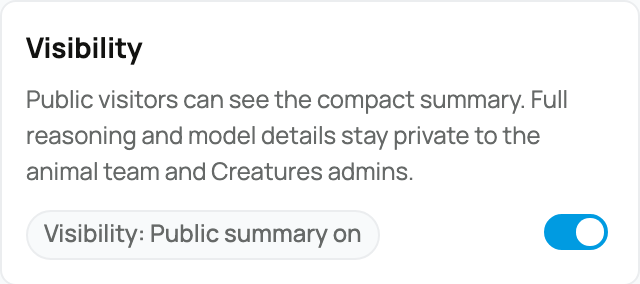
On the owner panel there is a "Display publicly" toggle. It is a per-animal opt-in that puts a compact Crestimate summary on the animal's public profile, where a buyer browsing can see it.
- Who can flip it: an owner or co-owner. Other people who can manage the animal see a read-only note rather than a switch.
- Off (the default): the Crestimate is hidden from non-owners.
- On: a non-owner sees a compact profile summary. Your reasoning, the comparable sales, and the details of how the number was reached stay private. Only the short summary becomes public.
What this means for you: turning it on is how a buyer looking at the profile gets a value signal from you, while everything sensitive behind the number stays yours. The panel describes the two states the same way: off is hidden from non-owners, and on is visible to non-owners as a compact profile summary with reasoning and the underlying details kept private.
Exactly what the public sees
The public summary is deliberately limited, and it changes with the confidence rating:
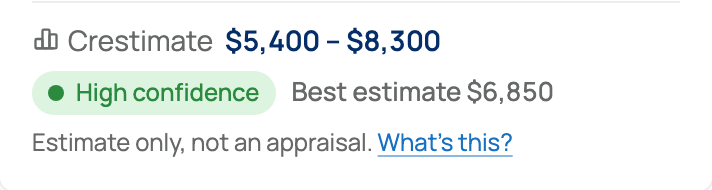
- Always shown: the range and a confidence indicator.
- The pinpoint ("Best estimate $X"): shown only at high or moderate confidence.
- At low or insufficient confidence: the pinpoint is hidden, so the public sees the range only, with a stronger caveat.

The two public notes are fixed, and we quote them exactly so the help center matches the product word for word:
Estimate only, not an appraisal.
is shown with the pinpoint at high or moderate confidence, and
Early estimate with limited data. Directional only, not an appraisal.
is shown at low or insufficient confidence, where the pinpoint is withheld.
What this means for you: a shaky estimate cannot be displayed publicly as a hard number. Creatures protects you from over-claiming by showing only a range, plus the stronger caveat, until the estimate is confident enough to stand behind a single figure.
Using a Crestimate to price a listing
A Crestimate is a useful starting point when you set a price, and it is wired to help without taking the decision out of your hands:
- Fixed-price listings: when the animal has an active listing, the owner panel shows a "Use this to help set your listing price" link that takes you to the listing's price field. It is a starting point, not an auto-set price. You still type the price you want. For the full fixed-price flow, see Listing an animal at a fixed price.
- Auctions: Creatures derives directional bid guidance from the low end of the range. The suggested opening bid is half of the range low, and the suggested reserve is the range low. Because low opening bids tend to draw more bidding, treat the suggested opening as a ceiling for where to start, not a floor. For the full auction flow, see Listing an animal for auction.
What this means for you: the Crestimate hands you sensible numbers to start from, then gets out of the way so you set the actual price and terms.
How a Crestimate connects to Finance
A Crestimate can also feed the management value Creatures uses for an animal in your books, on the animal's Finance tab. This is a separate system, and the connection is intentionally light-touch.

Here is how it fits together:
- A precedence order decides the management value. Creatures uses your own manual value first if you set one. If you have not, it uses an eligible Crestimate. If there is no eligible Crestimate either, it falls back to the animal's cost basis. For how cost basis works, see Animal cost basis and starting values.
- "Eligible" has a clear meaning. A Crestimate counts for Finance only when it actually produced a result and its confidence is not "insufficient". An insufficient-confidence estimate is skipped, so a shaky number never quietly drives your books.
- It shows up as a second opinion. The Finance panel shows the Crestimate next to your manual value as a second opinion. When the two are more than 20% apart, it flags the gap and offers a one-click "Use Crestimate" so you can adopt it on purpose if you want to.
- It does not touch your real accounting. Using a Crestimate for management value is for decision-making only. In the product's own words:
Estimated market values are for management decisions only. They do not change your accounting records, inventory lots, depreciation schedules, or tax basis.
What this means for you: a Crestimate can stand in as an animal's working value in Finance when you have not set one yourself, it is held to a confidence bar before it is allowed to, and adopting it never rewrites your accounting, inventory, or tax records. It informs a decision; it does not change the books.
To revisit what the estimate is and what its ratings mean, see What is a Crestimate?. To make or refresh one, see How to generate a Crestimate.
Related information
Updated on: 23/06/2026
Thank you!