Articles on: Breeding & Genetics

Managing your Genetic Inventory

Managing your Genetic Inventory


Your genetic inventory is the record of every straw, embryo, egg, and other piece of breeding material you hold. This guide covers adding an item, every field on the form and what choosing it means, linking source animals, and how each item's counts and status work.


Add a genetic item


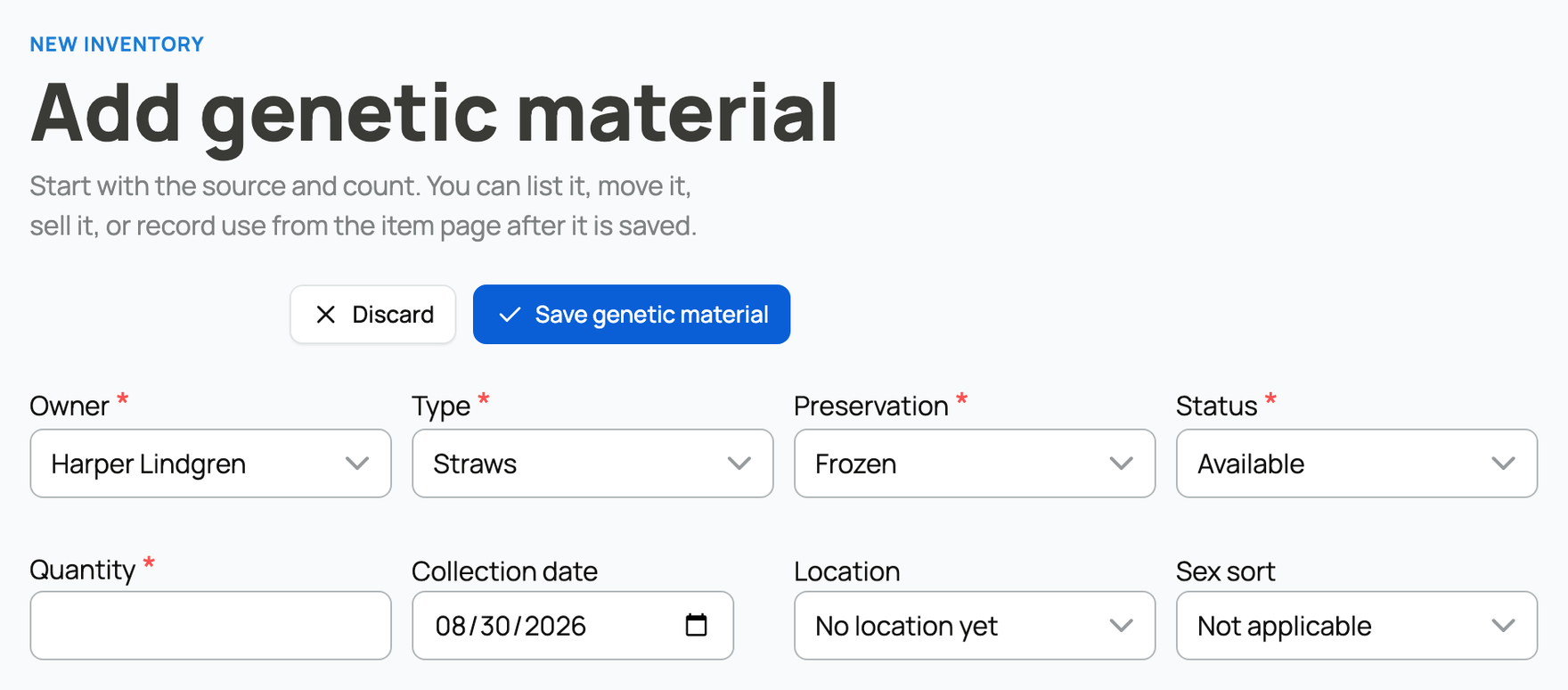
From your genetics dashboard, choose Add genetic material and fill in the form.


The add genetic material form


The core fields


These four fields sit at the top and shape everything else on the form:


  • Owner: you, or one of your organizations. The owner controls who can manage the item and where it can be listed or stored. This one cannot be changed after you save, so choose the right owner up front. If the wrong account owns an item, the only fix is to create it again under the correct owner.
  • Type: the material type (Straws, Embryos, Oocytes, Hatching eggs, Roe, Live juveniles, or Other). Type decides which other fields appear (a straw asks for a single donor, an embryo asks for a sire and dam) and which statuses are valid. It locks once the item has been listed, sold, or used, because changing the type after money or lineage is attached would break those links. Set it correctly before you do anything else with the item.
  • Preservation: how the material is kept. The choices are Frozen (long-term cryogenic, liquid nitrogen, needs cold-chain shipping), Chilled (short-term refrigerated), Fresh (used soon after collection), Live (living material such as live juveniles), and Ambient (room temperature, used for some hatching eggs). The form only offers the methods that make sense for the type you picked, so hatching eggs offer Ambient and live juveniles offer Live.
  • Status: the item's starting state, which is Available by default. You will usually leave this as Available and let recording a sale or a use change it later.


Quantity, dates, and location


  • Quantity: how many units you have. You can raise or lower this later, but never below what you have already sold or used.
  • Collection date: when the material was collected or produced. The label changes to fit the type ("Lay date" for hatching eggs, "Flush date" for embryos, "Hatch / birth date" for live juveniles), so the date always means the right event.
  • Location: which storage location the item is in. This is optional, and you can leave it unset, but assigning a location is what lets you see where each item physically sits (see Storage locations below).
  • Sex sort (straws): Conventional, Female sorted, Male sorted, or Mixed. This records whether the semen was sex-sorted, which buyers of breeding stock often want to know. It applies to straws; other types show it as not applicable.


Source animals


Depending on the type, you link the animals the material came from, and the rule differs by type because the biology does:


  • Straws, oocytes, and other link a single donor animal.
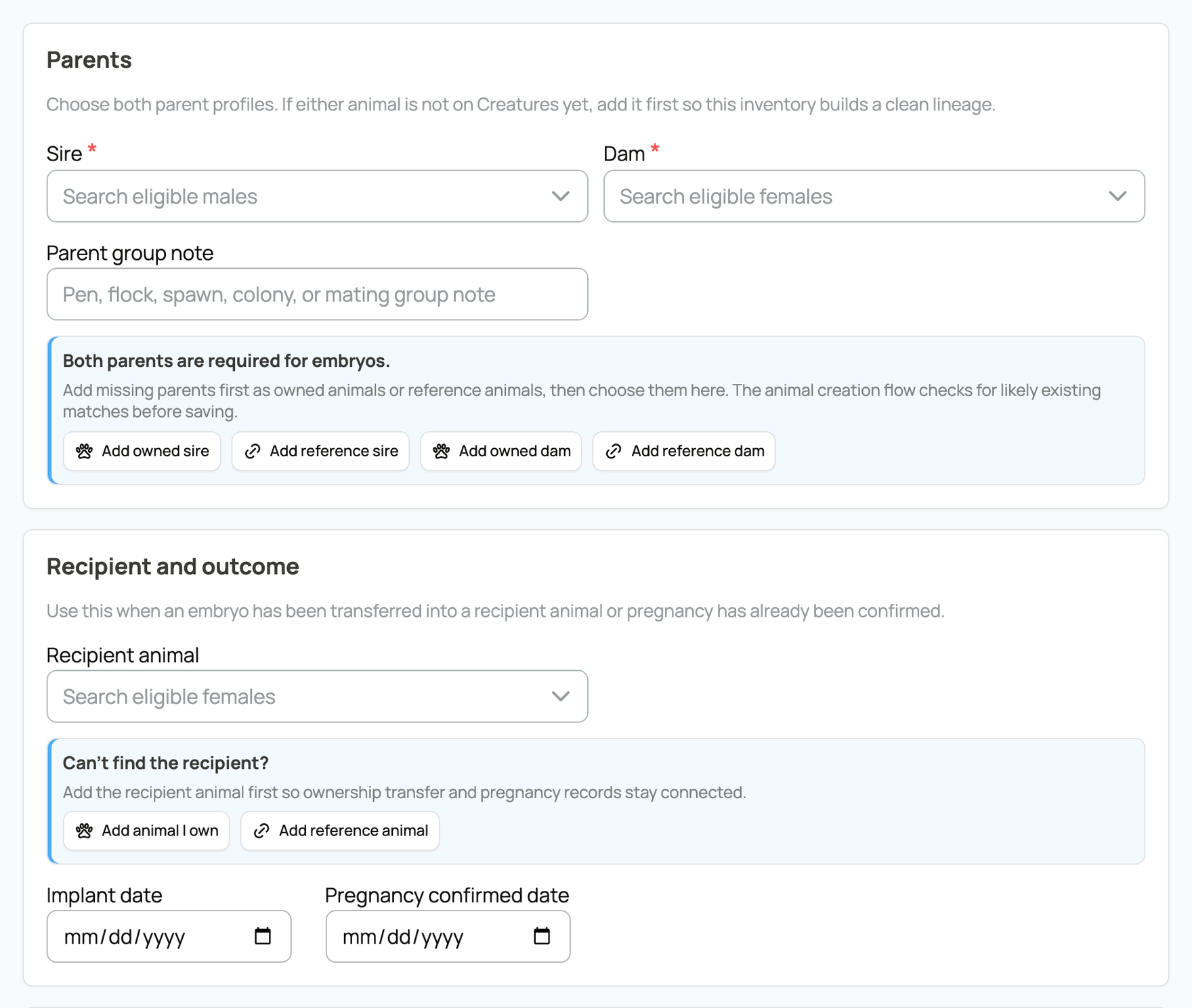
  • Embryos, hatching eggs, and roe link both a sire and a dam, since both parents define the offspring.
  • Live juveniles can link both parents when known, or, for colony or hatchery lots where the exact pair is not known, you describe the group in a parent group note instead.
  • Embryos can also link a recipient animal, with an implant date and a pregnancy-confirmed date, so an embryo transfer is tracked all the way through to a confirmed pregnancy. You can fill these in now or come back and add them after the transfer happens.


Type-specific fields for an embryo


If a parent is not in your animals yet, you do not have to leave the form: add it as an animal you own, or as a reference animal for an off-platform animal you do not manage. Linking the real parents (rather than typing a name) is what connects this material to a pedigree and to proven-producer history. For how that lineage is recorded and displayed on an animal, see Pedigree, family, and lineage.


Inventory details


Optional details keep large collections organized and are worth filling in once a tank holds dozens of items:


  • Storage labels (cane or straw labels like A1, A2): the physical labels on the material, so you can find a specific straw in a tank.
  • Facility label: the lab or facility that collected or holds it.
  • Batch number: a batch, CSS, or DNA number for traceability.
  • Quality grade: a grade such as post-thaw motility for straws or an embryo grade.


Some types add their own fields here: an embryo's stage, a hatching egg's fertility history, expected hatch date, and NPIP number, or roe's expected hatch date. These are optional, but they are exactly the details a careful buyer asks for.


You can also mark an item public so it shows on the linked animals' profiles. Private is the default. One thing to know: an item that is private becomes publicly visible while it is listed for sale (active listings are always public) and returns to your chosen setting when the listing ends. Finally, add private notes for anything only you should see.


Counts and status on an item


Open any item to see its detail page. As the owner you see three running totals plus the item's storage, source, and activity:


A genetic item's detail page


  • Available: units on hand and free to use, minus anything held for a buyer in checkout.
  • Sold: the cumulative count drawn down through sales. This never goes down.
  • Used: the cumulative count drawn down through use. This never goes down either.


To change an item, use its Quick actions:


  • Record sale and Record use draw units down and keep your counts honest. See Recording genetic sales and use.
  • List for sale starts a marketplace listing from this item. See Listing genetics on the marketplace.
  • Move shifts units between storage locations without changing any count.
  • Combine merges duplicate items that share the same owner, type, and parents into one, so a split-up collection reads as a single line.


When you edit an item's quantity, Creatures adds or removes available units to match, and it will not let you set the total below what you have already sold or used, so your history can never contradict your counts.


Storage locations


A location is a place your material physically lives, and giving each item a location is what turns a pile of straws into a map you can search. Locations have a type to match how cryo storage is actually organized: Facility, Tank, Canister, Cane, Goblet, Incubator, Brooder, Pen, Apiary, or Other. You can nest them (a cane inside a canister inside a tank), and you can flag a location as held at a third-party facility and name that facility, which is useful for informal storage that is not a paid Creatures storage subscription. You cannot archive a location while it still holds units or has child locations, so empty or move them first.


Updated on: 23/06/2026

Was this article helpful?

Share your feedback

Cancel

Thank you!