
Covering buyer fees and adding promoter rewards
Sale incentives can make a listing more attractive, but each seller-funded choice reduces the proceeds from a successful sale. Review the tradeoff before publishing.
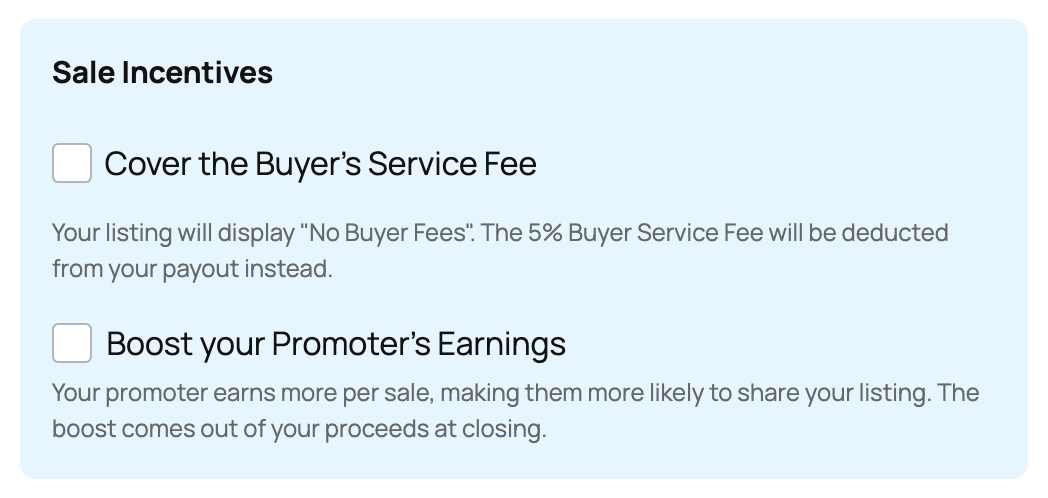
Cover the buyer's service fee
In the listing's Sale Incentives section, choose Cover the Buyer's Service Fee when you want the listing to show No Buyer Fees. The buyer does not pay the normal 5% buyer fee; that amount is deducted from your seller proceeds instead.
An event can require every seller to cover this fee. When an organizer uses mandatory coverage, the event rule controls the listing.
Increase a promoter reward
Choose Boost your Promoter's Earnings when you want to add a seller-funded reward for a successful promoted sale. The reward is paid only when an attributed sale completes, and it comes from your proceeds.
This does not raise the animal price or lower the buyer's checkout total. It changes how a completed sale is divided. Use a reward you can afford at the listed price.
Review the complete net
Your seller fee, covered buyer fee, event organizer fee, promoter reward, volume discount, and applicable transport treatment can all affect the amount reaching Wallet. They are separate choices and can apply together.
Before publishing, compare the expected net with the value of faster discovery or a simpler buyer price. After a sale, use the actual payout breakdown rather than estimating from the listing price alone.
Choose one reason for each incentive
Cover the buyer fee when a simpler all-in buyer price matters. Add a promoter reward when a particular sharing effort should earn more after an attributed sale. Neither choice guarantees more views or a faster sale, so keep the listing itself complete and accurately priced.
Check the incentive choices again before publishing. Once a purchase is complete, use that transaction's actual breakdown instead of expecting a later listing edit to change the settled amounts.
Related information
- Listing an animal at a fixed price
- Seller fees and the Creatures Pro subscription
- Offering a volume discount on multiple animals
Updated on: 03/09/2026
Thank you!